
Before you start
- The Enterprise plan. Registering an instance needs it. On another plan, the GitLab Self-Managed and Dedicated section reads Needs the Enterprise plan and shows no form. A host registered earlier keeps working whatever the plan becomes: connecting its groups, replacing its certificate or its application, and deleting it ask for no plan. See Pricing.
- The owner or admin role in IronBee, to register a host, replace its CA bundle or its application, and delete it.
- An administrator of the instance, for the application and the instance’s settings. An Owner of a group can make a group’s application instead.
- For each top-level group, one person who is both an Owner of the group on the instance and an owner or admin in IronBee, signed in to both in the same browser. They connect the group.
- GitLab 19.2 or newer, Enterprise Edition (with or without a license) or Community Edition, on any tier.
- The instance’s own host name: the name of its external URL. Not an alias and not an IP address, with at least two labels (
gitlab.acme.com, notgitlab). The instance answers athttps://<host>on 443, with no port and no path, and the name resolves to public addresses only, an IPv4 address among them. - The certificate of the authority that signed the instance’s certificate, when it isn’t a public one: a self-signed certificate, or your company’s own authority.
ironbee host setup, run from your machine by the instance’s administrator, makes the application and two of the instance’s settings: who creates IronBee’s service account, and IronBee’s webhook host among the allowed outbound requests. The other settings stay the administrator’s. See Prepare an instance with the CLI.
The network
The registration form in the console shows both, under IronBee’s address and Webhook host.
- Without IronBee’s address, the registration stops, saying the host refused IronBee’s address or didn’t answer in time, and later every review, wiki, code security scan and verification of the instance’s repositories fails.
- Without the webhook host, no event reaches IronBee: no merge request is reviewed when it opens or changes, no comment is answered and no wiki is built on a push. A firewall that takes addresses only can’t be served yet. GitLab’s own filter of outbound requests is one of the instance’s settings.
- A group that restricts access by IP address, on Premium and Ultimate, holds IronBee’s service account to its list too. An Owner adds IronBee’s address to the group’s list, as on gitlab.com; see Premium and Ultimate groups. The firewall and the group’s list are checked apart, so the address goes in both.
The application
Connecting a group is GitLab’s authorization of an OAuth application, as on gitlab.com. IronBee’s application on gitlab.com doesn’t exist on your instance, so you make one there, once, for every group of the instance:- An instance-wide application, by an administrator: in the Admin area, Applications, then Add new application. It outlives any group and any person, so prefer it.
- A group’s application, by an Owner of the group: in the group, Settings > Applications, then Add new application. It serves the connect of any group of the instance, and is deleted with its own group.
Click Save application, then copy the Application ID GitLab shows. Leave the secret where it is: IronBee never asks for it.
GitLab compares a redirect URI character by character, so copy both whole. The registration form shows them under Redirect URIs, and Copy the redirect URIs copies them one per line.
The instance’s settings
An administrator sets these in the Admin area, under Settings. Who creates IronBee’s service account. Connecting a group creates IronBee’s service account in it, with the grant of the Owner who connects.- On the Enterprise Edition, with or without a license, only administrators create a group’s service account by default, and GitLab refuses the Owner’s. The connect stops with GitLab’s words,
User does not have permission to create a service account in this group.Either an administrator turns on Allow top-level group owners to create Service accounts (Settings > General, Account and limit) and the Owner starts the connect again after about a minute, or an administrator who is also an Owner of the group connects it. - On the Community Edition there’s no such setting, and an Owner of a top-level group creates the service account as the instance comes.
integrations.ironbee.ai to Local IP addresses and domain names that hooks and integrations can access and save. Without it, the instance refuses IronBee’s webhooks, and the console shows GitLab’s answer on each repository’s row, with the name to allow. The next sync after the name is added puts the hooks on.
Git over HTTPS. IronBee clones over HTTPS with its service account’s tokens. Where Enabled Git access protocols is Only SSH, every clone is refused, and every review and analysis fails.
Register the instance
In the console, open Integrations and select GitLab. In the GitLab Self-Managed and Dedicated section, click Register a host. Above its fields, the Register a GitLab host form shows what the application takes under The application on the instance. It asks for:
Below the fields, the form shows IronBee’s address, the Webhook host and Where the code is processed, which reads “IronBee processes the repositories’ code in the United States (AWS us-west-2, Oregon).”
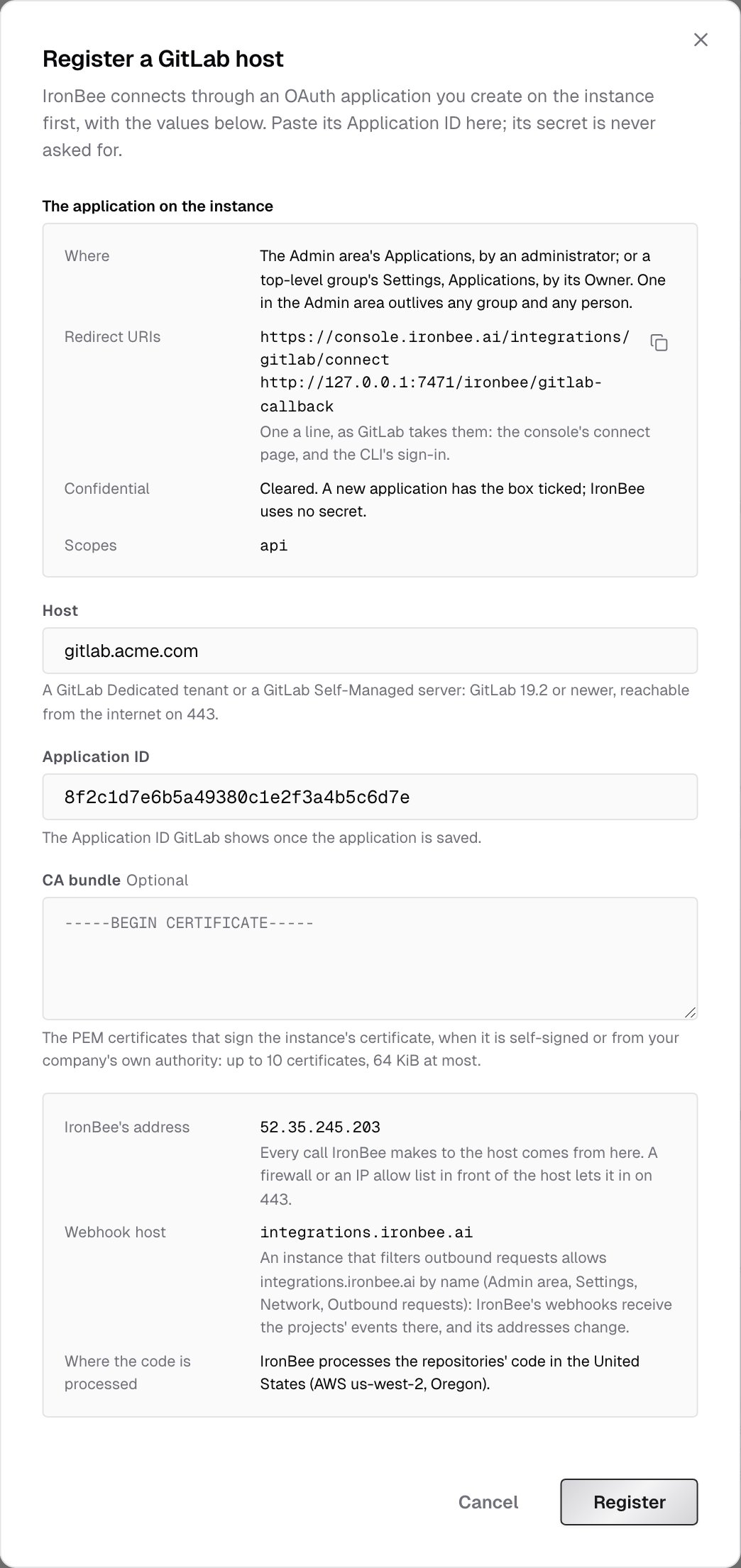
It also refuses a host that isn’t a name of the shape above, a name under gitlab.com (groups there connect from GitLab), an application ID that isn’t 16 to 128 letters, digits, underscores and hyphens, and a CA bundle that isn’t 1 to 10 readable certificates within 64 KiB.
Connect a group
Each top-level group connects on its own, from the host’s Connect a group, by the person Before you start names:1
Authorize on your instance
Your browser goes to your instance’s authorization page for the application. Sign in there if asked, and authorize IronBee.
2
Pick the group
Your instance sends you back to Connect GitLab to IronBee, which reads the instance’s version and lists the top-level groups you own there. Pick the group and click Connect.
3
Pick the repositories
Pick the group’s repositories IronBee works on, as on gitlab.com. See Connect a group.
ironbee-<group path>, a Maintainer of the group, which uses no seat; a webhook on each repository you pick; and an IronBee reader account in a project, at its first job. See What IronBee creates in the group. On GitLab’s Free tier, an instance holds 100 service accounts in all, IronBee’s among them. Your own grant serves the connect only: IronBee revokes it when the connect ends.
If the connect stops
The other messages are the same as on gitlab.com. See If the connect fails.
Reconnect and Disconnect work on a host’s group as on gitlab.com. See Managing the connection.
GitLab Dedicated
A Dedicated tenant is a GitLab instance that GitLab runs for you alone, on Ultimate. Every step on this page holds for it, with your tenant in place of your server, except for what follows. The tenant’s name. Register the name your tenant answers under:<tenant>.gitlab-dedicated.com, or your own domain when the tenant was set up with one. Give a CA bundle only for a certificate a public authority didn’t sign.
The tenant’s IP allowlist. Your tenant can take requests from listed addresses only, through the IP allowlist you keep in Switchboard, GitLab’s console for your tenant. The allowlist covers the whole tenant, its OAuth and API addresses included. If it’s on, add IronBee’s address, 52.35.245.203, described as IronBee, before you register the tenant. Otherwise the form refuses the registration, saying the host refused IronBee’s address. Switchboard has no API for its allowlist, so ironbee host setup only names the address. Opening only the tenant’s OpenID Connect address to every address, which GitLab offers on request, doesn’t serve IronBee: the registration also calls the tenant’s API, and so does every later call.
A top-level group’s own IP restriction holds on a tenant too, apart from the tenant’s allowlist, so the address goes in both.
The tenant’s settings. The instance’s settings are in your tenant’s Admin area, as on the Enterprise Edition. GitLab keeps some of a tenant’s settings for itself, such as its rate limits.
Webhooks from the tenant. Your tenant sends IronBee’s webhooks from its own addresses, which GitLab can change. IronBee takes a delivery from any address, so there’s nothing to allow on IronBee’s side.
Data residency. A Dedicated tenant’s region covers what GitLab itself stores. IronBee processes your repositories’ code in the United States (AWS us-west-2, Oregon), whichever region your tenant is in. To keep code review in your own network, use the self-hosted runner.
The host in the console
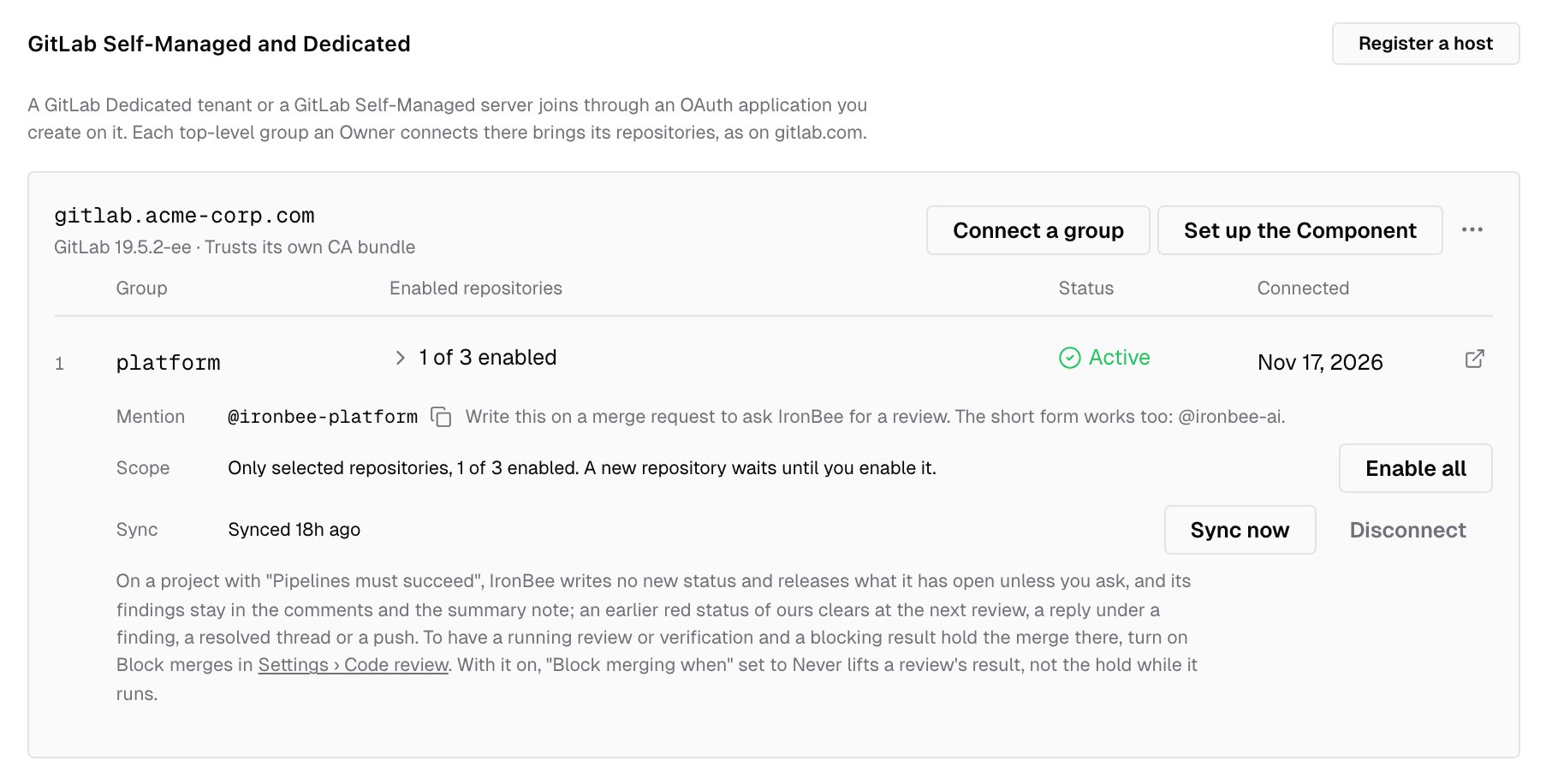
Integrations > GitLab lists each registered host in the GitLab Self-Managed and Dedicated section, with its GitLab version, read at the last connect, and Trusts its own CA bundle when it has one. Each host has:- Connect a group
- Set up the Component, once an active group has a repository enabled, or covers all of its repositories and has at least one. See The GitLab component
- an actions menu with Replace the CA bundle, Replace the application and Delete
Replace the certificate or the application
An owner or admin chooses Replace the CA bundle or Replace the application in the host’s actions menu. No plan is asked.- The CA bundle, when the instance’s certificate changes to one the stored bundle doesn’t verify, such as a renewed self-signed certificate or a move to another authority. Until it’s replaced, every call IronBee makes to the instance is refused. IronBee calls your instance with the new bundle before it keeps it, so the instance must already serve a certificate the new bundle verifies. To change with no gap, replace the bundle before the change with one that holds both the old and the new authority, then with the new one alone after it. Remove the bundle is for an instance that moved to a certificate from a public authority.
- The application, when it was deleted and made again on the instance, or another one replaces it. IronBee tries the new ID as at the registration. The application serves only connecting a group, so a deleted one stops no review: it stops the next connect or reconnect, until its ID is replaced.
The GitLab component
The IronBee GitLab component runs in your instance’s pipelines, from your copy of the component on the instance. See The GitLab component on Self-Managed and Dedicated. The console’s setup steps open for a project on your instance from the host’s Set up the Component, or from the prompt on a project’s card. They ask for Your copy of the IronBee Component, write the pipeline file, and link to the project’s CI/CD variables and pipeline editor on your instance.The IronBee CLI
Use CLI 0.54.0 or newer.- Your instance is GitLab to the CLI once IronBee names it among your account’s hosts. See Your account’s GitHub and GitLab hosts.
ironbee review,ironbee verifyand the CLI’s hooks then name your repository by its whole path with its host, so their work lands in that repository’s project. A local review needs the repository’s group connected, with code review on, as on gitlab.com.- The CLI’s own reads of your instance, such as the merge requests a commit belongs to, use
GITLAB_TOKENwhenGITLAB_HOSTnames your instance. Without it they’re anonymous, and a private project’s work links to no merge request. - A private certificate authority. The CLI is a Node program and doesn’t read your system’s trust store: set
NODE_EXTRA_CA_CERTSto the authority’s PEM file. - An instance named by an IP address or by one label isn’t named as a host. A run there goes on without a repository, and one that asks for a merge request or a commit (
--pr,--commit) stops.
Prepare an instance with the CLI
ironbee host setup <host>, run by an administrator of the instance, makes the application, turns on Allow top-level group owners to create Service accounts where it’s off, and adds IronBee’s webhook host to the outbound allowlist where the instance blocks all requests but that list. Token lifetimes, Disable personal access tokens and the Git access protocols stay the administrator’s choices. It then opens the console’s registration form with the host and the application’s ID filled in. ironbee host allow-address adds IronBee’s address to a group’s IP restriction. What no API offers stays by hand: IronBee’s address in your firewall or in your tenant’s allowlist, and the registration itself, an act on your IronBee account in the console. See Enterprise hosts.
Delete a host
An owner or admin chooses Delete in the host’s actions menu. IronBee disables every repository of the host’s groups, disconnects the groups, and removes the host. The projects stay in IronBee with their history, and are no longer reviewed. For each group, IronBee calls your instance as a disconnect does: it revokes its tokens and removes its project accounts and webhooks. What stays on your instance, for you to remove. After the delete, the console links Open the applications of your instance and Open the service accounts of each group:- The application, in the Admin area’s Applications, or in the group’s Settings > Applications, where you made it
- IronBee’s service account of each group, on the group’s Settings > Service accounts, by an Owner, or in the Admin area’s Users, by an administrator. Deleting it also ends any token of it IronBee couldn’t revoke
- A webhook IronBee couldn’t remove, when your instance didn’t answer or there were too many to remove at once: in the project’s Settings > Webhooks, a hook to
integrations.ironbee.ai - A project account IronBee couldn’t remove, named IronBee reader, in the Admin area’s Users
Not available yet
- An instance IronBee can’t reach from the internet, such as a Dedicated tenant reached only through AWS PrivateLink. The self-hosted runner serves it
- GitLab Dedicated for Government
- An instance named by an IP address, by one label or by an international name; a port other than 443; an instance under a path; an instance with no IPv4 address
- GitLab older than 19.2
- Fixed addresses for IronBee’s webhook endpoint, for a firewall that takes addresses only
- A group access token in place of IronBee’s service account, where Owners may not create service accounts: an administrator who owns the group connects it instead
- A token pasted in place of the application, and creating the application from the console:
ironbee host setupmakes it from your machine - Verification started by a Vercel or Netlify deployment of a repository on your instance
- Personal namespaces, as on gitlab.com
What’s next?
Code review on GitLab
What IronBee posts on a merge request, the pipeline status and the commands.
GitLab component on your instance
Verify merge requests from your copy of the component.
Enterprise hosts in the CLI
Prepare an instance with
ironbee host setup.Self-hosted runner
Review merge requests in your own GitLab CI/CD, with your own model.