
Find the pull requests
Two lists show the same rows and open the same pull request page.
Next to a project’s Code review tab, its Code wiki tab explains the repository’s code.
On Projects, a GitHub, GitLab or Bitbucket project’s card links in too:
- Click the project’s name or its Code review row to open the project’s Code review tab with the same date window.
- Click a bar of the Code review row to open the pull requests reviewed in that slice of the window.
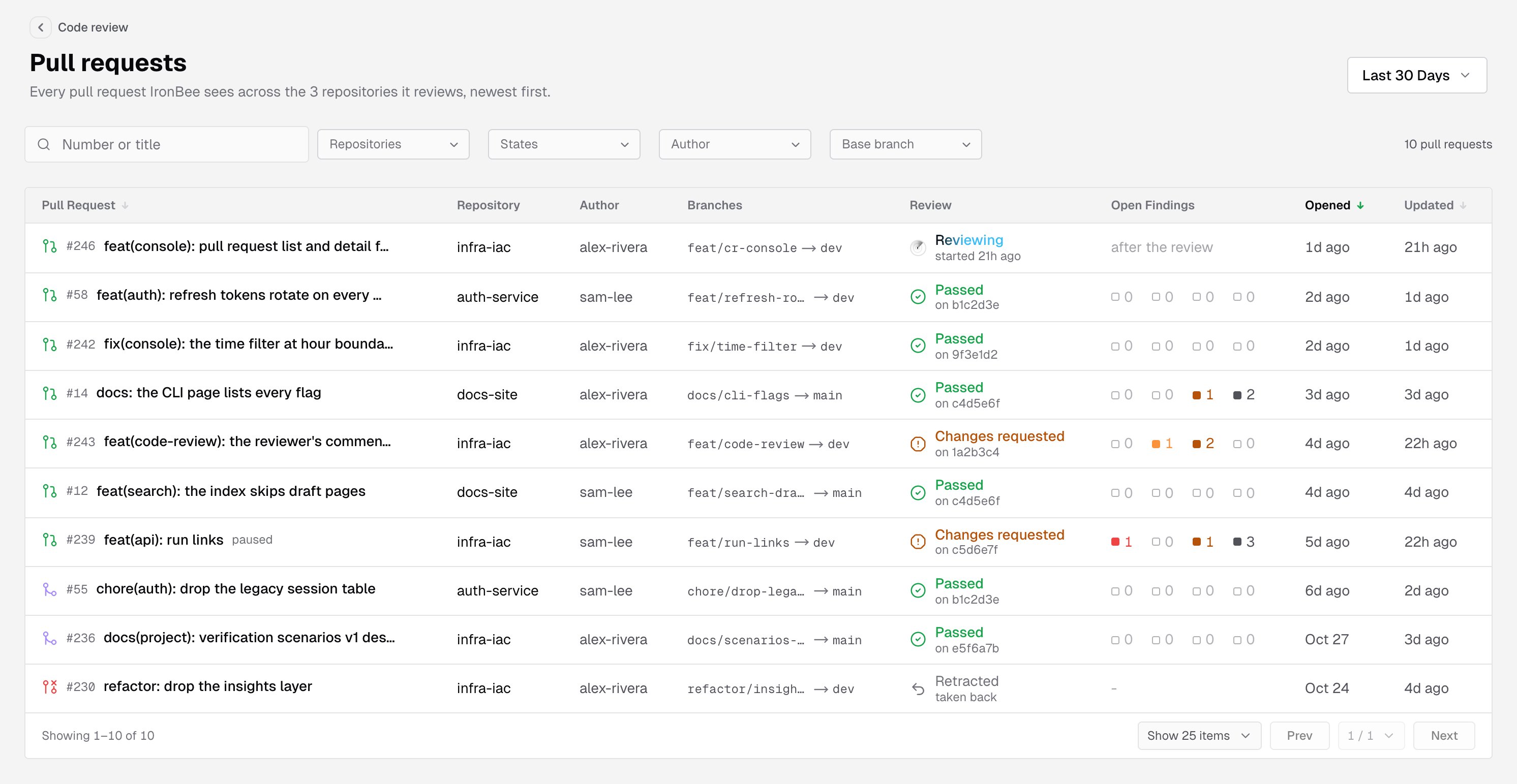
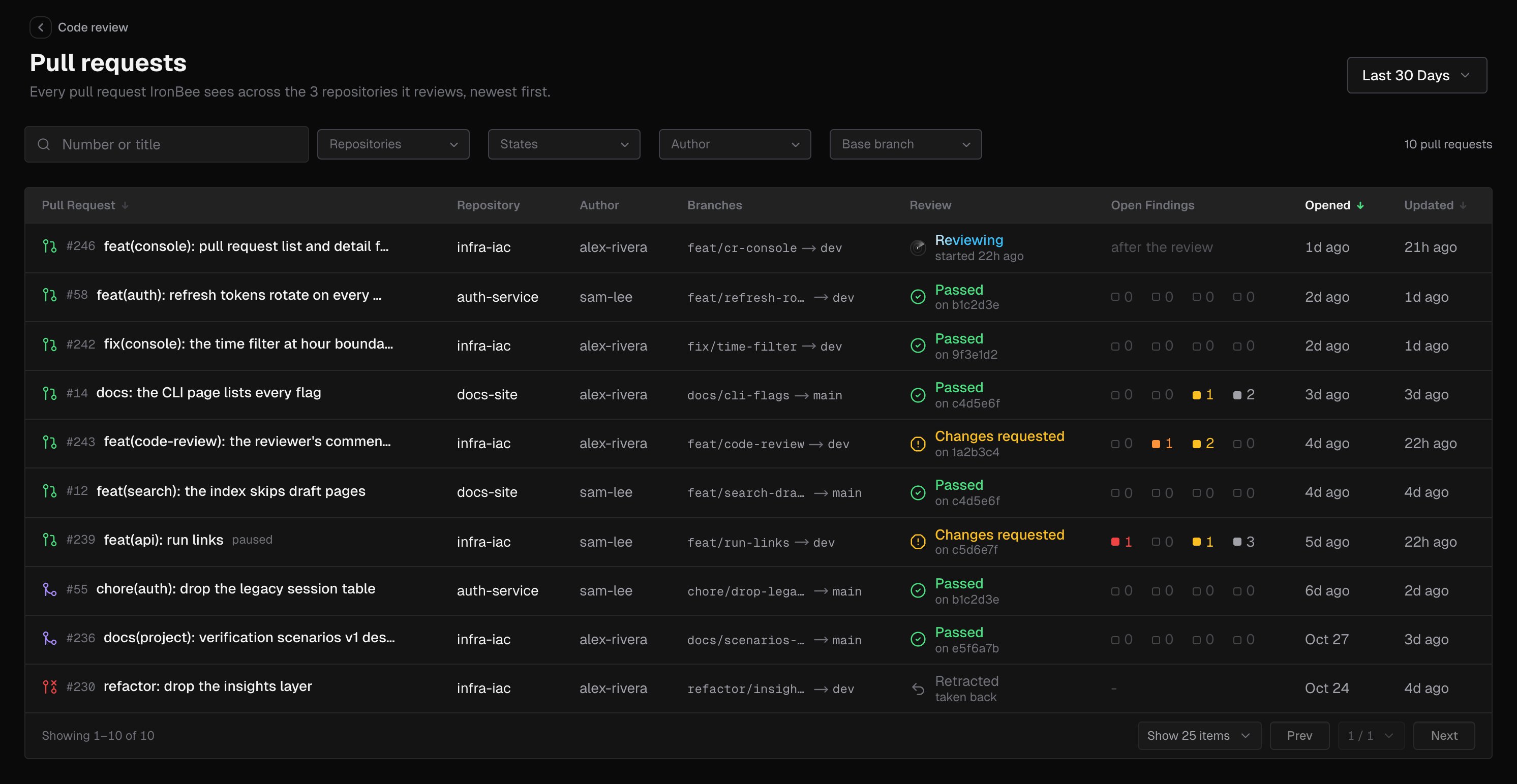
Filter and search
- The date filter in the page header shows the pull requests IronBee reviewed in that window: those whose latest review started inside it. Pick Last 24 Hours, Last 7 Days, Last 30 Days, Last 90 Days, or a Custom Range. A pull request with no review in the window isn’t listed; tick Needs review to see the open ones.
- Number or title finds a pull request by its number, with or without
#, or by words from its title. - Repositories (sidebar list only) and States (Open, Merged, Closed) take several values at once. Each option shows how many pull requests it has.
- Author and Base branch take one value. Pick it from the menu, which shows each one’s count, or type a GitHub login or a branch name. Any author and Any branch clear them.
- Needs review shows only the open pull requests IronBee hasn’t reviewed. See Pull requests that need a review.
- Clear filters resets them all. The count at the end of the bar says how many pull requests are left, such as 12 of 40 pull requests.
Pull requests that need a review
Tick Needs review in the filter bar to list only the open pull requests IronBee hasn’t reviewed, whatever the dates. The box shows how many there are.- The date filter is hidden and States is disabled, since the list holds open pull requests only.
- A pull request whose first review is running stays listed until the review ends.
- The list reads the newest 100 open pull requests. When there are more, the box’s count ends with
+, such as12+, and the count at the end of the bar reads like 12 among the newest 100 open pull requests. - On a project’s Code review tab, for owners and admins, the console first asks GitHub, GitLab or Bitbucket for the repository’s open pull requests. One IronBee never heard of, such as a pull request opened before the repository was connected, is listed too.
Columns
Hover a time in Opened or Updated to see the full date and time.
You can sort by Pull Request (its number), Opened and Updated. A page shows 25 rows; switch to 50 or 100 under the list.
While a review runs, the list refreshes on its own until it ends.
Review
The Review column, and the band on the pull request page, show one of these words with a detail line under it:
For Changes requested and Passed, the detail line names the commit the check is on. It adds an earlier commit, as in on a1b2c3d, an earlier commit, when that isn’t the commit IronBee last reviewed. The merge block severity is the Block merging when setting; see Code review settings.
Not reviewed gives the first reason that applies:
Open findings
The Open Findings column shows four counts, always in this order: critical, high, medium and low. A zero is drawn hollow. Hover a count to read it, such as 2 High open or no Medium finding open. Before IronBee has published a review, the column shows-, or after the review while the first one runs. With Needs review ticked, an open pull request with no review shows a Review button there instead; see Pull requests that need a review.
Empty lists
The pull request page
The page’s title is the pull request’s number and title. The line under it gives:- the state (Open, Merged, Closed, or draft)
- the author
- the head and base branches
- when it was opened, or merged
- when it was last updated
- paused, when reviews are paused on it
- Open on GitHub
The status band
The band under the header sums up what IronBee says of the pull request, from left to right:- The review: the same word and detail line as the list’s Review column. The commit links to the repository’s host.
- What’s open: the open findings by severity, such as 1 Critical · 2 High open, or nothing open. Then 3 addressed and 2 listed below the comment threshold when there are any. These counts match the findings list under the band.
- The check: IronBee’s check on a1b2c3d, the head, or an earlier commit when the check isn’t on the latest commit IronBee reviewed, or no check on GitHub (no check on Bitbucket on Bitbucket). After it comes the merge block in effect: blocks a merge while medium or worse is open, blocks a merge while high or worse is open, or never blocks a merge. On GitLab, the band reads IronBee’s result on a1b2c3d, the head instead, because a project may carry no status of IronBee’s. With Block merges off, the merge part reads “writes no new status that holds a merge; an earlier red one clears at the next review, a reply under a finding, a resolved thread or a push”. With Block merges on and Block merging when on Never, it reads “a review’s result never blocks a merge; where pipelines must succeed, a running one holds it”. See Merges.
- The reviews: how many reviews IronBee published and when the last one finished, such as 3 reviews · the last finished 2h ago, or no published review.


The summary
Under the status band, the Summary card shows the pull request summary IronBee wrote for the approver. The console reads it from the host: IronBee’s section of the description on GitHub, IronBee’s summary note on GitLab, or IronBee’s summary comment on Bitbucket.- Folded: the card shows the summary’s first paragraph. Click the Summary heading or Show more to open the rest, and Show less to fold it again.
- The header: the commit the summary describes, such as of a1b2c3d, which links to it, and Open on GitHub. When someone edited the summary on the host after IronBee wrote it, the header adds changed on GitHub since IronBee wrote it.
- What it draws: the summary’s text, tables and Mermaid diagrams, with its folded parts closed. Images aren’t drawn.
Jobs and settings in effect
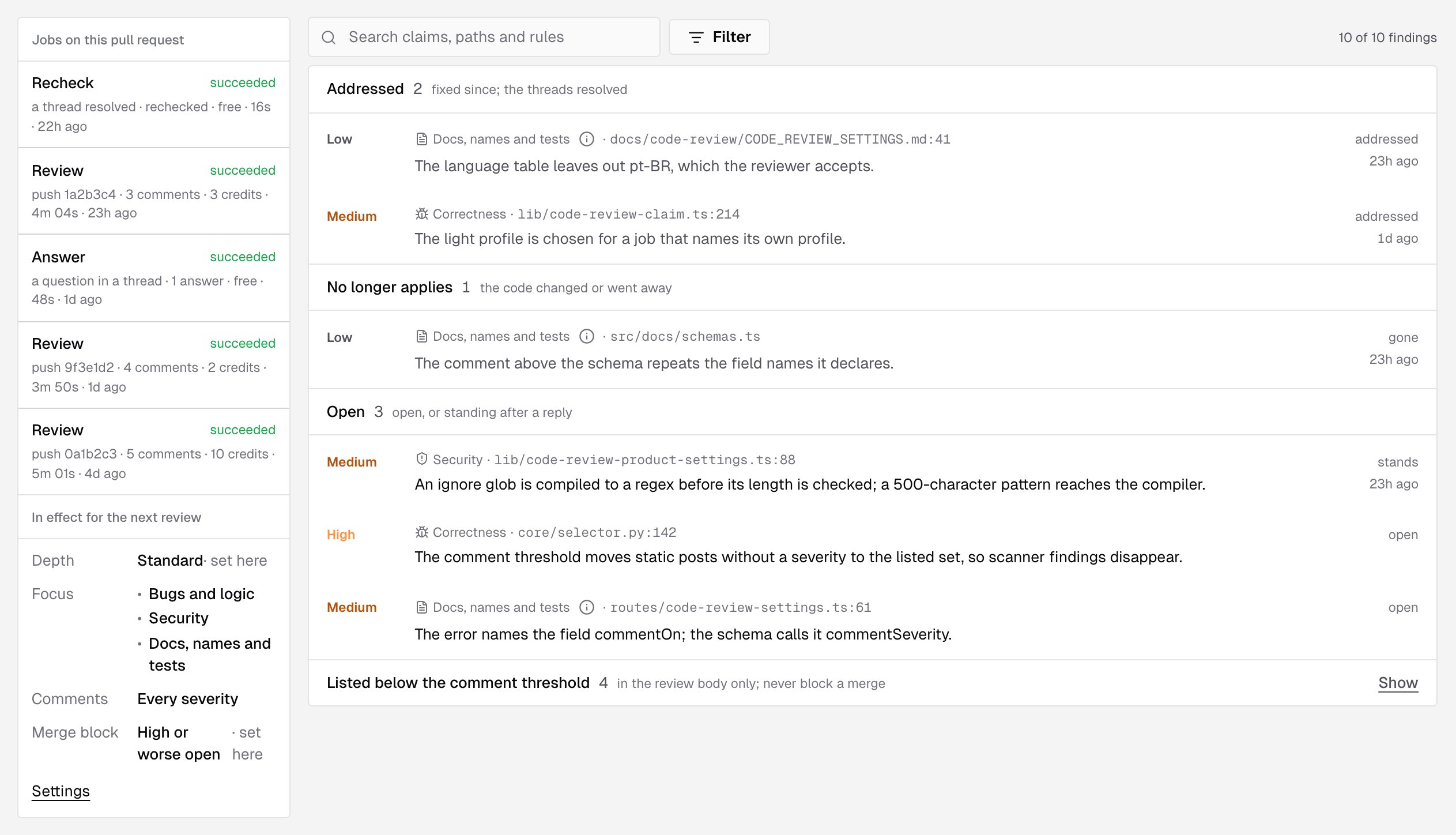
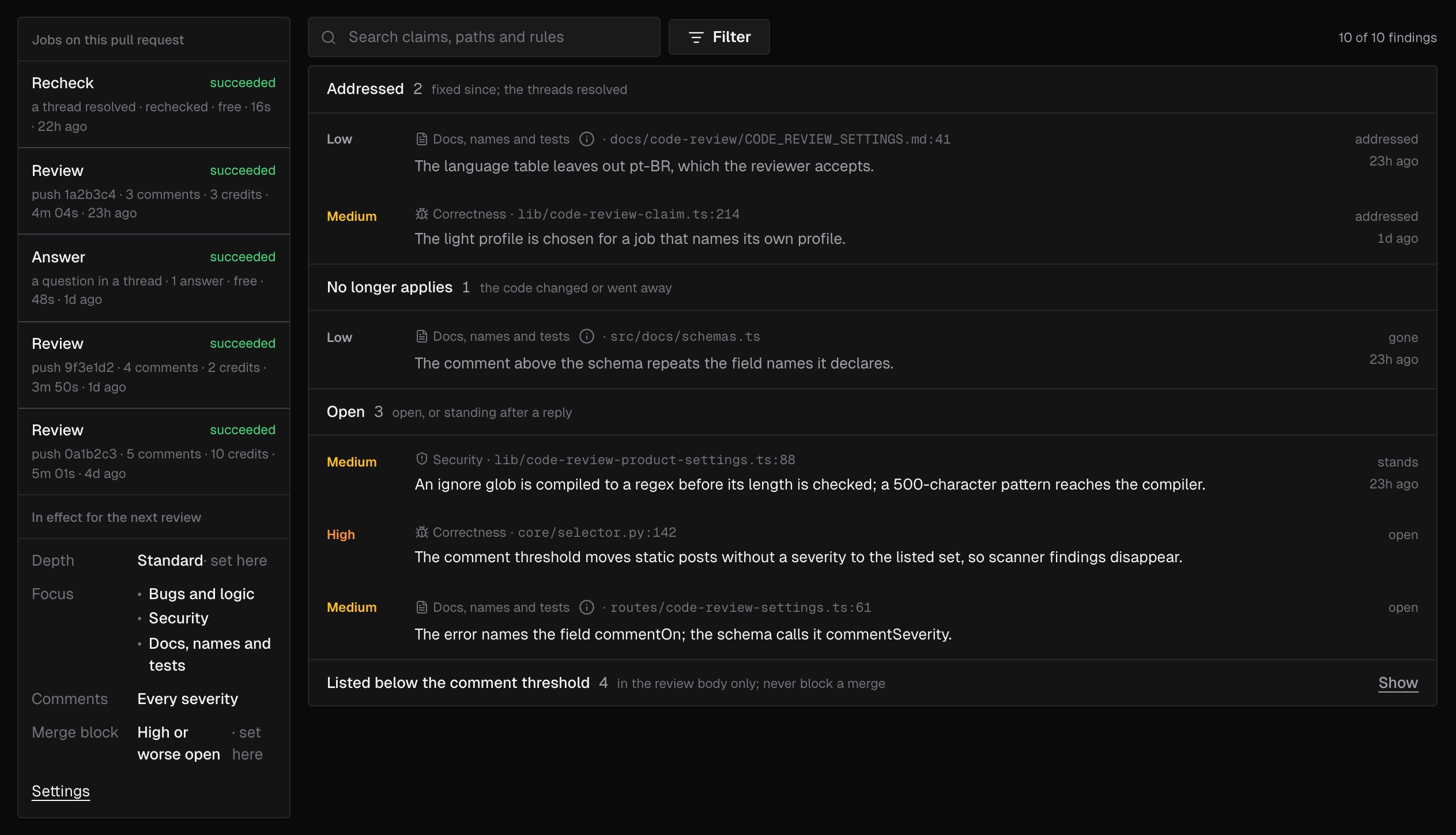
The rail on the left of the page has two parts. In a narrow window, it moves under the findings.Jobs on this pull request
Every job IronBee ran on the pull request, newest first. When there are more than the rail shows, the last line says how many older ones are left out, such as 4 older not shown. With no job yet, the rail says No job has run on this pull request. Each job shows its kind, its status, and a line with what started it, what came of it, its credits (what it used, what it’s expected to use while it runs, or free), how long it ran and when it was created. Hover the line to see the date and time.
What came of a job reads 4 comments or 2 answers, the reviewer’s own word for the run, or why it failed. A cancelled job adds nothing there.
The status is one of queued, starting, running, publishing, succeeded, failed or cancelled. A job that hasn’t ended has a Cancel link; see Cancel a job.
In effect for the next review
The settings the next review of this pull request will use:
A value the repository sets for itself, rather than taking the account’s, is marked set here. When code review is off for the repository, the section says Code review is off for this repository. Settings opens the repository’s code review settings; see Code review settings.
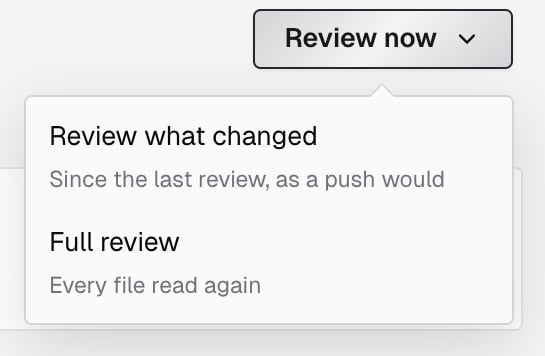
Review now
Review now asks IronBee to review the pull request again. It opens a menu with two choices:
A review you ask for runs even when reviews are paused on the pull request. It spends the account’s credits; see Pricing.
After you pick one, a message confirms what happened:
- Review queued: IronBee reads the pull request and posts what it finds on GitHub. The job appears at the top of the rail as Review with asked · from the console, and the band and the list’s Review column read Reviewing.
- A review is already queued: the review already waiting covers your ask, and nothing more was queued.
- A review is already running: ask again once it has ended.
- the project is archived: The project is archived
- code review is off: Code review is off for this repository
- the team’s credits are used up, with the date they reset
- a job is already running: A job is already running on this pull request
Cancel a job
A job that hasn’t ended has a Cancel link in the rail. Click it to stop the job:- Cancel requested: The job stops at its next step. Its status then reads cancelled.
- The job had already ended: it finished before the cancel reached it.
Findings
The findings list on the right holds every finding of the pull request, grouped by what became of it. A group shows the number of findings in it and what it means:
The groups come in that order, and a group with nothing in it is left out. Open always shows, so an empty one says so. Each group’s heading is a button that folds or opens its rows. Listed below the comment threshold starts folded and the other groups start open. A group that holds the finding open in the dialog stays open. Inside a group, the findings that changed most recently come first, then the rest by severity, worst first, and by file and line. A long group shows 20 findings at first. The buttons under it, such as Show 20 more and Show all 45, show the rest, and a count such as 20 of 45 shown says how many you see.
A finding’s row
Each row shows:- The severity: Critical, High, Medium or Low. If a later job rated the finding again, the row shows the new severity.
- The category: Correctness, Security, or Docs, names and tests, which has an info mark that explains it.
- The file and line, where the finding stands now.
- The claim: what IronBee says is wrong.
- The state: open, stands, addressed, changed, gone, withdrawn or turned down, with when it last changed. An addressed row is dimmed, with a check mark before addressed.
Filter the findings
- Search claims, paths and rules matches the claim, the file path, and the rules, memories and skills the finding cites.
- Filter opens a panel that narrows the list by Severity, Category and State, each option with its count, and to findings that Cites a rule or memory. State offers the row states and listed below the threshold.
- The count beside the button reads like 8 of 14 findings. Each filter in force shows as a chip you can remove, and Clear all removes them all.
The finding dialog
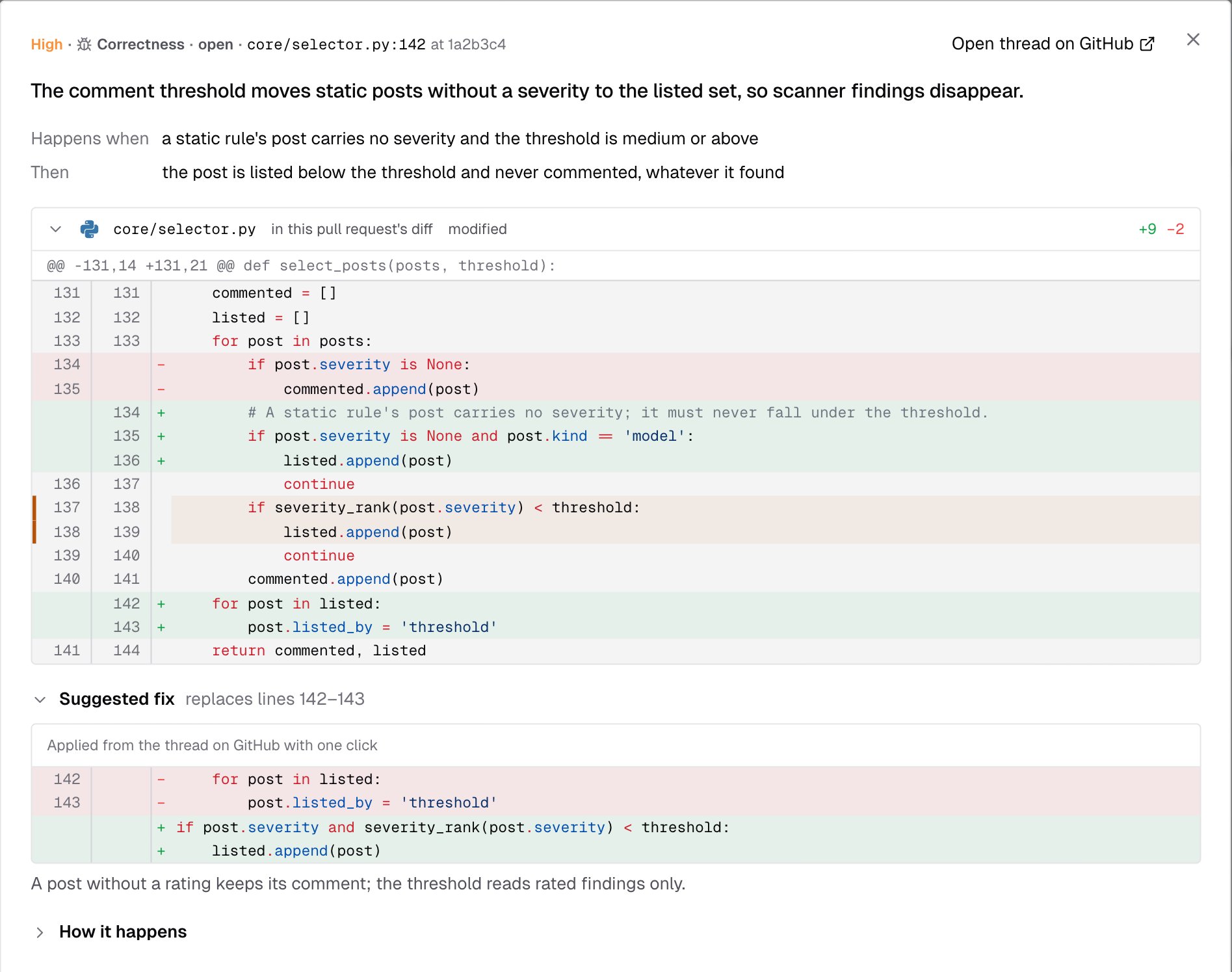
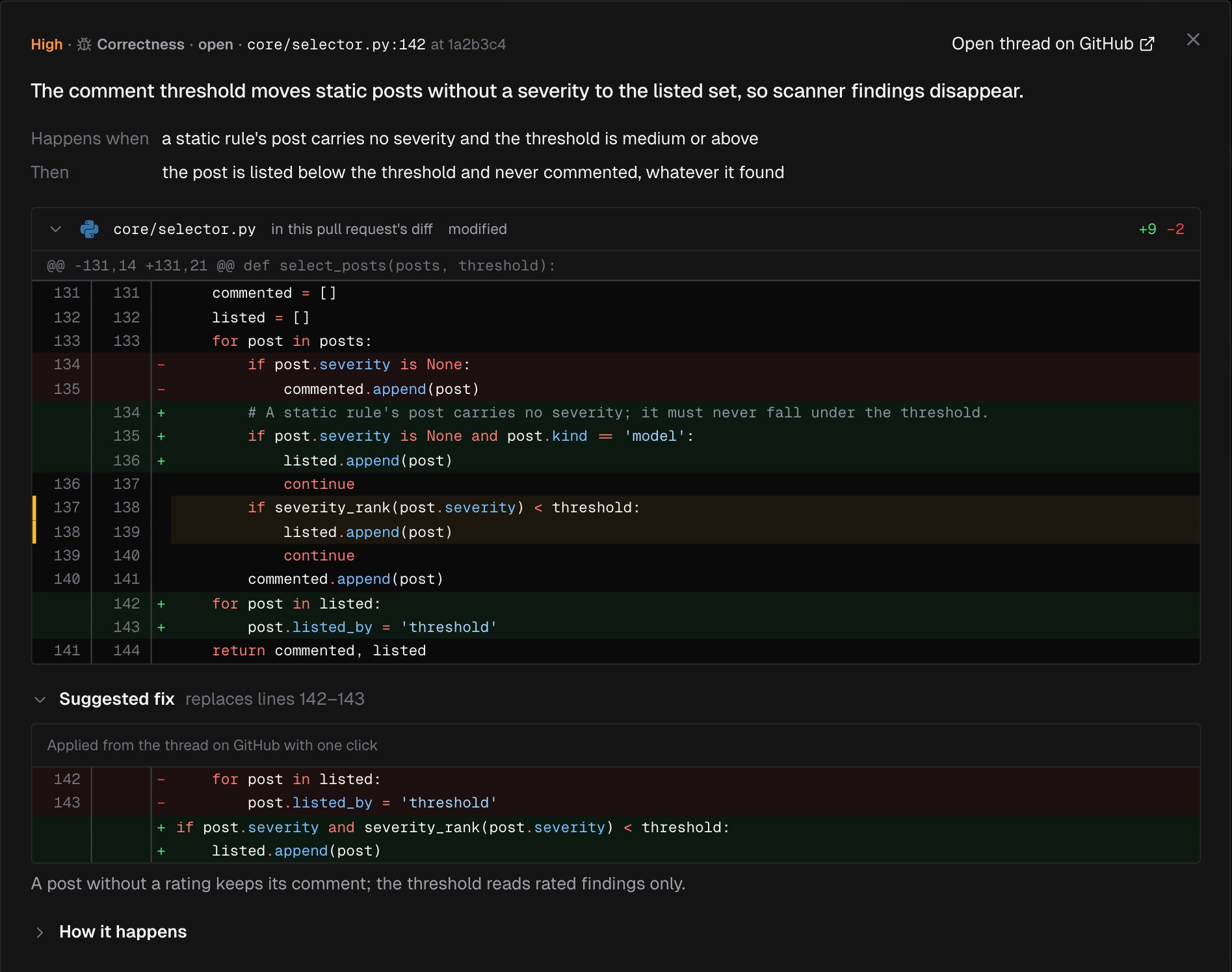
The dialog shows one finding in full. Its first line gives the severity, the category, the state, and the file and line at the reviewed commit. Open thread on GitHub opens the finding’s comment thread. Under it, the claim is the dialog’s title. The sections follow in this order. A section with nothing to show is left out.- Happens when and Then: what triggers the problem, and what happens next.
- The diff: the part of the pull request’s diff that holds the finding, with its lines marked. The header gives the file, how it changed, its added and removed lines, and in this pull request’s diff. Click the header to fold it. When the diff can’t be shown, a note says why, followed by the lines IronBee quoted:
- The file is not in the pull request’s diff any more.
- GitHub gives no diff for this file (binary, or too large).
- The pull request changes more files than the console reads from GitHub.
- The quoted lines are not in the diff any more.
- Suggested fix: the fix from the finding’s comment, as a diff, with the lines it replaces, such as replaces lines 12–14. Its caption reads Applied from the thread on GitHub with one click. A note from the reviewer may follow. If the comment can’t be read, the dialog says The comment could not be read from GitHub. or The comment is no longer on GitHub.
- How it happens: a diagram of the order, state or path behind the finding. Folded until you open it.
- Where this rests: other places in the code the claim relies on. Each links to the file at the reviewed commit, with its line, such as Line 42 in a1b2c3d, and the lines themselves.
- Cites: the Rule, Memory and Skill entries the finding relies on. See Rules and memories.
- History: what happened to the finding, in order:
- Posted by the review at a1b2c3d.
- Each later change: Still open, Stands, Addressed, The code changed, The code went away, Withdrawn or Turned down, with after a reply on the thread and the commit when they apply. IronBee’s sentence about it follows. Read the whole reply on GitHub opens the reply, a line such as now rated high shows a new severity, and the thread was resolved by someone else says a person, not IronBee, resolved it.
- How the thread stands now: Thread open on GitHub, Thread resolved by IronBee, No comment on GitHub any more, or Listed in the review body; no comment of its own.
Move between findings
The footer shows where the finding stands in the list, such as 3 of 14, and the buttons Previous and Next. Next names the next finding’s file and line. The order is the list’s, with its filters. Press← and → to move, and Esc to close. Inside the code, the arrow keys scroll it instead.
Who can see and do what
Billing admins see none of these buttons. On an archived project, Review now is disabled. See Roles and permissions.
What’s next?
Code review
How IronBee reviews a pull request.
Code review on GitHub
What IronBee posts on the pull request itself.
Code review settings
Depth, focus areas, comments and the merge block.
Rules and memories
What a finding can cite, and how to manage it.