
ironbee-ai[bot]. To turn code review on, see Code review.
Each review also appears in the console, with its findings. See Pull requests. To review a branch before you open a pull request, use ironbee review in the CLI.
What starts a review
These pull request events start an automatic review:
With Only when asked, nothing starts on its own. Other events, such as an edited title or a new label, never start a review.
These settings keep an automatic review from running:
These settings hold back automatic reviews only. A person who asks with
@ironbee-ai review, or with Review now in the console, still gets a review. Comments and pushes from bots never start anything.
When code review is off for the repository, IronBee doesn’t review its pull requests and ignores commands there. See Code review settings for where each setting lives and who can change it.
The review IronBee posts
IronBee posts one GitHub review on the commit it read. The review is a comment: it never approves a pull request or requests changes. Whether a finding holds a merge is up to the check.The review body
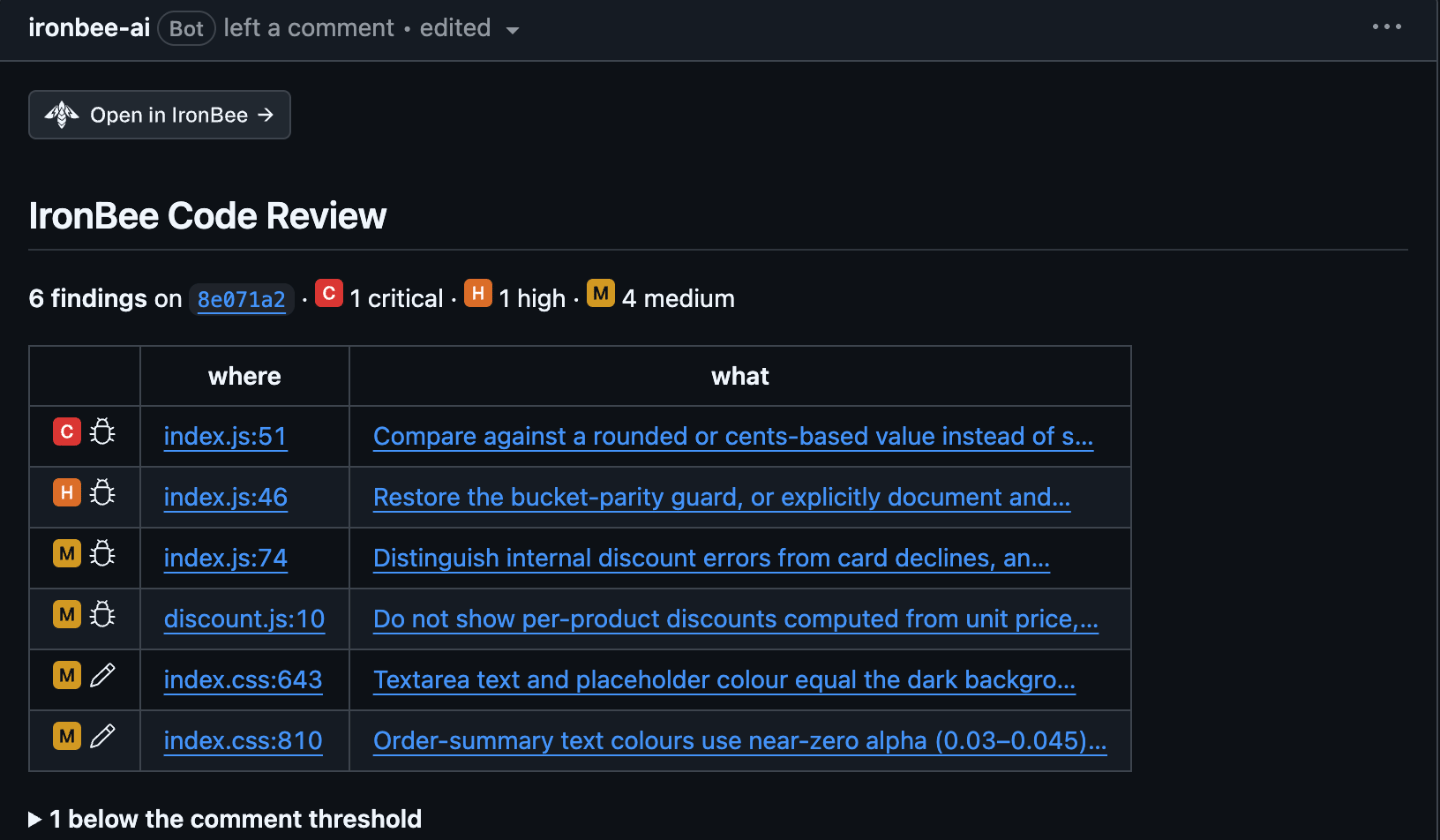
The body opens with an Open in IronBee button, which opens the pull request in the console:
 Under it comes the heading IronBee Code Review, the same in every Comment language, on every review: the first one, a follow-up, or one with no findings. Then come:
- The head line: the number of findings on the commit, with the counts by severity, such as 3 findings on
abc1234·
 1 high ·

 2 medium.
- Notes on how the review was made, in italics. For example, how many files Paths to ignore left out (“2 files left out by the repository’s settings.”), that Auto depth read a large change at a lighter depth, or a Partial review note naming the files that weren’t read in full, which the next review reads.
- The team’s rules and memories the review applied (“Applied 2 rules and 1 memory: …”), and any of the repository’s rule files it left out as invalid, with why. See Rules and memories.
- The findings table: one row per finding, most severe first. The first column holds the severity and kind marks, where links to the line at the reviewed commit, and what links to the finding’s inline comment. After 10 rows, the rest fold under +N more.
- Findings below the comment threshold: the findings whose severity is under the Comment on findings of setting, folded under N below the comment threshold. A low finding that reads as a minor remark is listed there too, whatever that setting says. They get no inline comment of their own and never hold a merge.
- A diagram of where the findings sit: the folders and files of the change, each finding colored by its severity. See Diagrams.
- The feedback line: ”👍 or 👎 on a comment teaches the next review.”
abc1234.”
| Severity | Icon |
|---|---|
| Critical |   |
| High | |
| Medium | |
| Low |   |

 correctness,

 security, or

 editorial, for text, names or tests that disagree with the code. A finding the review rated down instead carries why:

 preference,

 style,

 docs,

 test only or

 debug only.
Diagrams, the pull request summary and replies on a thread can’t hold images, so they mark severity with colored dots: 🔴 critical, 🟠 high, 🟡 medium and 🔵 low. A review too long to hold the icons uses the same dots.
Inline comments
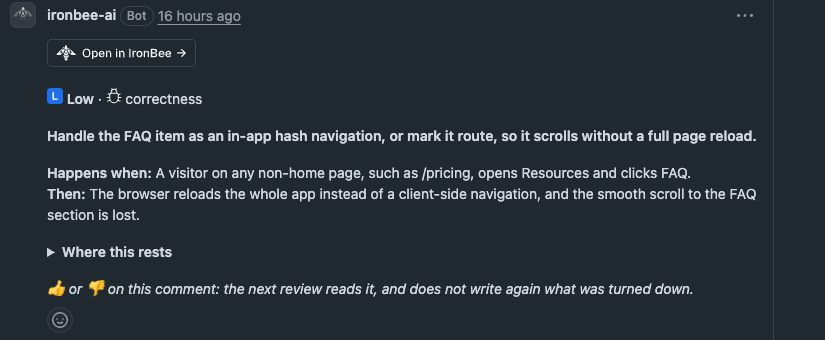
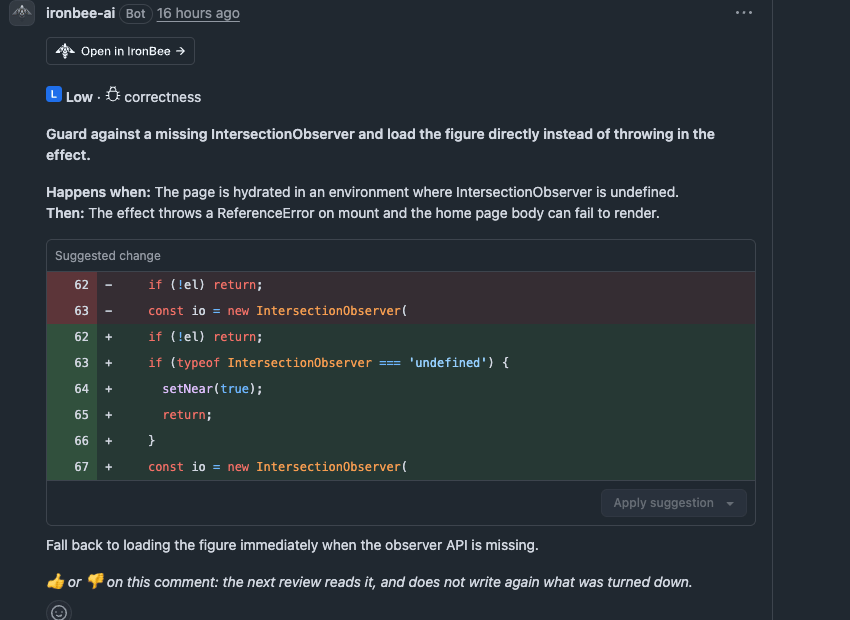
Each finding gets an inline comment on its line of the diff. A comment holds, in order:- An Open in IronBee button, which opens the finding in the console.
- The severity and the kind: High · correctness.
- The finding, in bold.
- Happens when: the condition that triggers it, and Then: what goes wrong.
- How it happens, a folded diagram, on a finding about an order of events, a state or a path through the code. See Diagrams.
- A suggested fix, as a GitHub suggestion you can apply with Commit suggestion. Turn these off with Suggested fixes. When a fix can’t be a suggestion, it’s a code block headed “Suggested fix (replaces lines 12-14):”.
- The team’s rules and memories the finding relies on, one line each: “Rule
name” or “Based on team memoryname”, with its level and first line, or a link to the repository file it comes from. See Rules and memories. - Where this rests, a folded list of the lines the finding relies on, such as a caller, a definition or the place a guard is missing.
- The same fix also answers: other findings, in other files, that the same change fixes.
- For a finding from one of IronBee’s built-in checks, the source it relies on: “Source: …”.
- The feedback line: ”👍 or 👎 on this comment: the next review reads it, and does not write again what was turned down.”
Diagrams
IronBee draws its diagrams in Mermaid, which GitHub renders in place, from the pull request’s own code. The examples below use a made-up change. Where the findings sit. The review body maps the findings onto the change: the pull request at the root, then the folders and files with their counts by severity, then each finding as a hexagon in its severity’s color, with its kind, its line and the start of its title. A file shows its three most severe findings and folds the rest into +N more. On a large change, folders and files fold too, behind a dotted line. The map is left out only when the review body would be too long for GitHub. How it happens. A finding that depends on an order of events, a state or a path through the code carries a diagram of it, folded under How it happens in its inline comment. It uses the names from the code and draws at most six boxes. There are three kinds:- Order of events
- State
- Path
A sequence diagram, for steps that fail only in a certain order, such as a callback, a retry or a lifecycle. The functions are the participants, each step is an arrow, and a note marks the step that fails.
The pull request summary
With Pull request summary on, IronBee adds a section at the end of the pull request’s description, headed Summary of this pull request, with an Open in IronBee button under the heading. Its first line says where it comes from:
Written by IronBee from the code at abc1234. This section is rewritten when the pull request changes; the text outside it is the author’s.
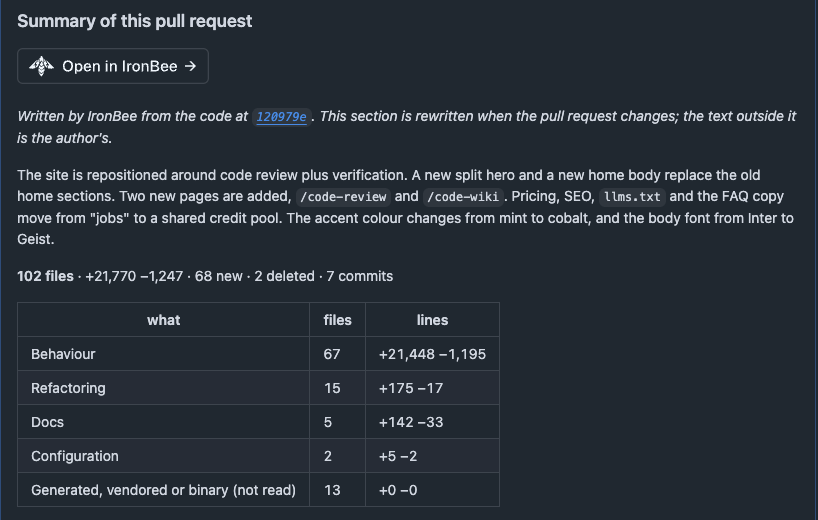
- the change in numbers, by kind: behavior changes, refactoring, tests, docs, configuration, generated files, and files that weren’t read
- Impact: what the change reaches, in fixed fields in this order: UI, API, Data, Configuration, Dependencies and Breaking. Each field holds up to three points and shows only when it has one
- What changed, grouped by what each part of the change is about
- How it fits together, with diagrams and a folded map of which changed files use which
- Where to look, with the review’s findings on each file
- A reading order
- What this change leaves out, such as “No test file is changed.”
- Files and Commits, folded
Follow-up reviews
After the first review, a push (with Automatic reviews on On open and every push) or@ironbee-ai review starts a follow-up review. It reads what changed since the last review, not the whole pull request again. When the author’s changes since the last review make up more than 75% of the pull request’s changed lines, it reads the whole diff again. @ironbee-ai full review reads the whole pull request.
A follow-up review checks the earlier findings again:
- A finding whose file the push changed, anywhere in that file, is read against the new code.
- Every other open finding is read again too, against what the push changed, so a fix in another file can mark it addressed.
With Reply only, IronBee replies and leaves the threads of fixed findings open for you to resolve. When the change makes a finding more or less severe, the reply ends with “Severity now 🟠 High (was medium).” IronBee replies only when something changed: a finding still at the same place gets no new reply.
After you apply a fix IronBee asked for, the follow-up review doesn’t post a new finding that only remarks on the trade-off the fix made, or that asks you to undo it. A defect the fix brings in is still reported.
Under its heading, the follow-up review’s body starts with what happened since the last review: “Since
abc1234 (now def5678): 1 new · 2 addressed · 0 no longer applicable · 3 still open”. When people turned findings down, the line ends with a count such as ”· 1 turned down”. Then come the new findings, with their table, and a fold, Still open from earlier reviews, listing the earlier findings that are still open, linked to their threads. An earlier finding that was listed in the review body has no thread to reply on, so what changed about it is listed under Earlier findings without a thread, one line each. New findings don’t repeat what an earlier review said, or what someone turned down.
The IronBee review check
Every review sets the IronBee review check on the commit it reviewed. Details opens the pull request in the console. See Pull requests.While the review runs
The check starts as IronBee review · in progress. Its summary names the depth, such as “review (Standard) in progress”, and the credits the review will use. As the review moves on, the title shows how far it is, such as IronBee review · 40% · reviewing changes. The steps are preparing, reviewing changes, checking findings and writing the review.When the review is done
The title says what the review found:
The summary starts with the commit, the change’s size, how long the review took and the credits it used. A follow-up review’s summary adds what changed since the last review, such as “Since
abc1234: 1 new · 2 addressed · 0 no longer applicable · 1 turned down · 3 still open”, with the turned-down count only when there are some. Links lead to The review and The pull request’s summary. The details below hold the review’s findings table and, after a follow-up review, the findings it found addressed.
Conclusions
The Action required conclusion holds a merge only where the branch’s protection rules require the IronBee review check. Without that, it’s information only.
Only open findings count toward the conclusion. A finding listed below the comment threshold never counts, and neither does a finding whose thread a person resolved or that a person turned down. When a person resolves or unresolves one of IronBee’s threads, IronBee rechecks the conclusion right away. The title shows what’s open now, and the summary gains a line such as “Rechecked after a thread was resolved or unresolved: …”. A thread IronBee resolved itself doesn’t count as resolved by people.
A neutral check never holds a merge. Its title names what happened:
A settings change applies from the repository’s next pull request event. A check already on GitHub keeps its result until the next review.
Commands
Write a command in a comment on the pull request’s Conversation tab, mentioning@ironbee-ai:
Only the pull request’s author and people whose GitHub association with the repository is owner, member or collaborator can give commands. IronBee doesn’t act on commands or questions from anyone else.
retract needs one of those three associations: being the pull request’s author isn’t enough.
IronBee reads a command in these forms:
- Case doesn’t matter:
@IronBee-AI Reviewworks. - A colon or comma after the mention, and
pleasebefore the command:@ironbee-ai: review,@ironbee-ai, please review. again,pleaseornowafter the command, and a closing.or!:@ironbee-ai review again.re-reviewandrereviewmeanreview.full re-reviewmeansfull review.- Text before the mention, on the same line:
Fixed both. @ironbee-ai review. - The command must end its line. With more words after it, IronBee reads the comment as a question.
- Quoted lines (starting with
>) and code blocks are skipped. When a comment holds several commands, the first one counts. retractworks anywhere after the mention:@ironbee-ai please retract this.
pause and resume in turn, the newest one decides. IronBee answers an older one with “Superseded by a later pause: it is paused, as the newest one says.” or the resume equivalent.
Anything else that mentions @ironbee-ai is a message to IronBee. If it’s a question, IronBee answers it in a reply, from its open findings and the code. Only new comments count: editing a comment to add a mention or a command does nothing. Mentions in an inline review comment, or in the text of a review, aren’t read.
The command words are English, whatever the Comment language.
Replies, reactions and resolved threads
IronBee reads what people do with its comments. As with commands, only the pull request’s author and people whose association with the repository is owner, member or collaborator count.
A finding that’s turned down gets no reply. It leaves the open counts and no longer holds a merge. With Close fixed threads on Resolve the thread, IronBee resolves its thread. In the console, it’s listed under Turned down; see Findings.
With Answer questions off, IronBee doesn’t answer replies under its comments. It still reads a reply that turns a finding down.
When a review doesn’t run
Asking with
@ironbee-ai review or Review now reviews a pull request that the first six rows hold back.
Credits
A review uses credits, whether it started on its own, from@ironbee-ai review or @ironbee-ai full review, or from Review now. What it costs depends on the change’s size and the review’s depth. See Pricing.
These use no credits:
- answers to replies under IronBee’s comments, and answers to questions in the conversation
pause,resumeandretract- the recheck after a person resolves or unresolves a thread
- IronBee’s read of how its comments were received, when the pull request is closed or merged
- a review that was too large, already reviewed, couldn’t complete or wasn’t published
@ironbee-ai reviewwhen nothing was pushed since the last review
When credits run out
When the team’s credits for the month are used up, IronBee doesn’t review, answer questions, or act onpause and resume until the credits reset or the team’s allowance is raised. retract and the recheck still work.
- A review, automatic or asked for, sets a neutral IronBee review · out of credits this month check and reads nothing. If the commit already has an IronBee review check, IronBee leaves that check as it is, so a refusal never lifts a blocking result, and replies on the pull request instead.
- A question,
pauseorresumegets a reply: “This team’s IronBee credits for this month are used up, so this pull request was not reviewed. Reviews start again when the credits reset or the team’s allowance is raised.” - A reply under one of IronBee’s comments gets no answer.
What’s next?
Pull requests in the console
Every reviewed pull request, its findings and its reviews.
Code review settings
Triggers, depth, output and merge blocking, for the account and each repository.