

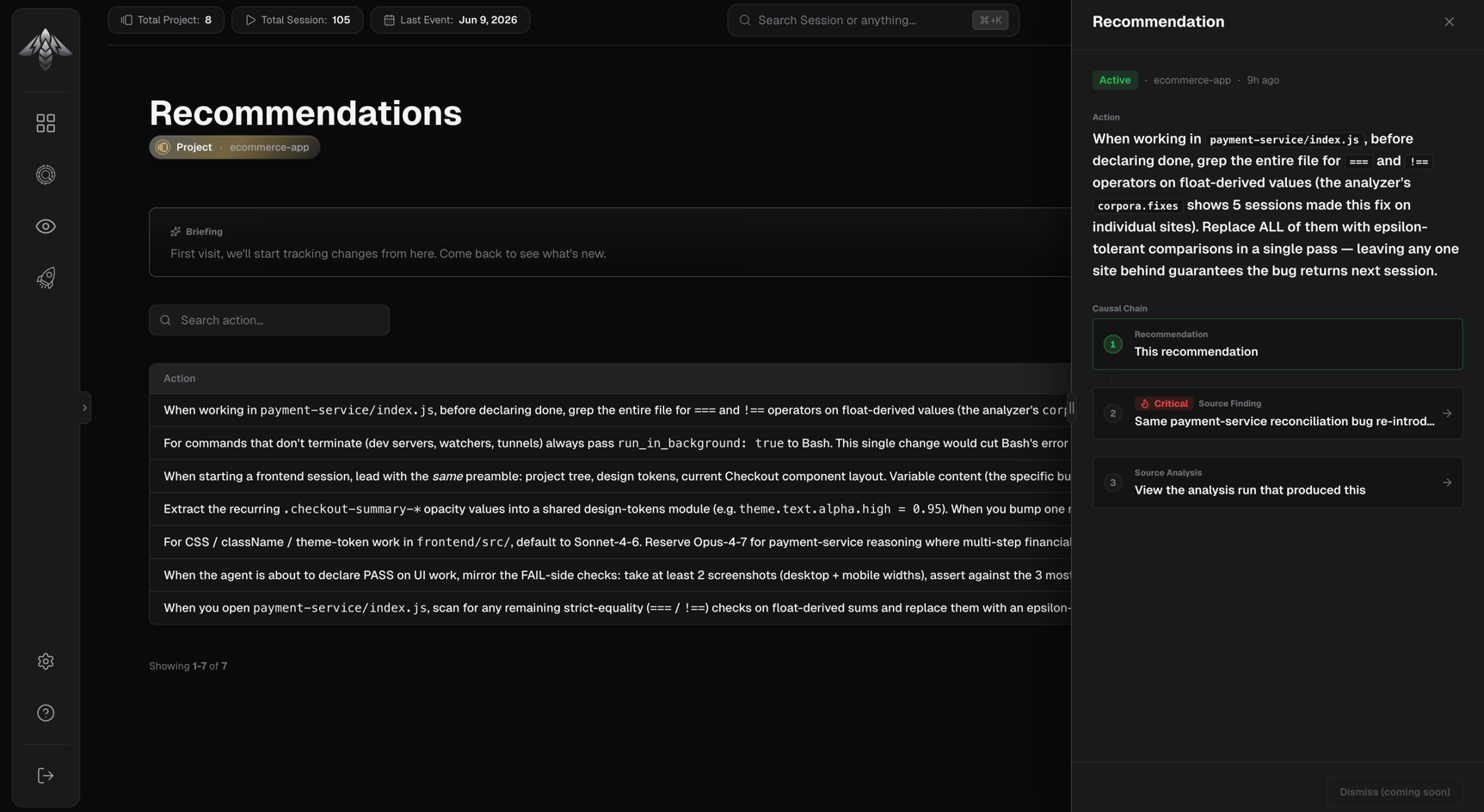
Recommendation statuses
Only
active recommendations appear in the list. Dismissed and superseded recommendations are not shown.
Briefing panel
Shown above the recommendations list on each visit. Reports changes in active recommendation count since your last visit:- First visit: starts tracking from this point; come back to see deltas
- No changes: nothing new since your last visit (shows timestamp)
- Changes detected: new and resolved recommendations summarized
Filters
Active filters appear as chips. Pinned filters (Finding ID, Analysis ID) are cleared individually.
There are no severity or area filters on the recommendations page.
Recommendations table
Two columns, both sortable (no Project column, scope is already fixed to the selected project):
Default sort: Created, newest first. Page sizes: 20, 50, or 100 rows.
Recommendation detail drawer
Click any row to open the detail drawer:- Status badge:
activeordismissed, shown in the header - Metadata line: scope (project name), created date, dismissed time (if applicable)
- Action: full markdown description of the recommended directive
- Causal chain strip: three-step provenance trail:
- Recommendation: this recommendation
- Source Finding: the finding that triggered it, with severity badge
- Source Analysis: the analysis run that produced the finding