> ## Documentation Index
> Fetch the complete documentation index at: https://docs.ironbee.ai/llms.txt
> Use this file to discover all available pages before exploring further.
# Key Concepts
> Core terminology you will encounter throughout IronBee.
 ## Project
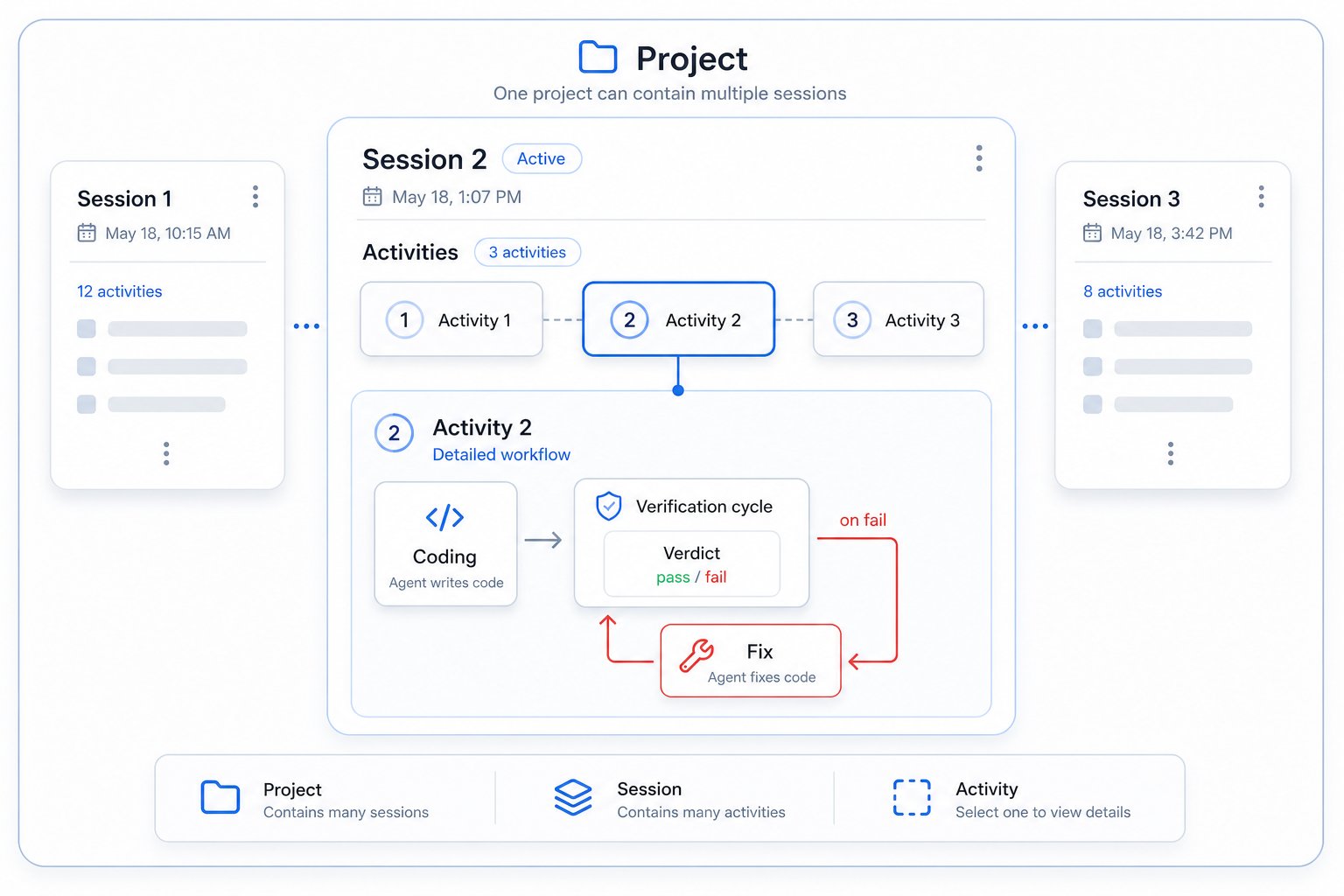
A **project** maps to a codebase, in practice usually a single git repository. When you run `ironbee install` in a directory, that directory is associated with a project in the console. All sessions, verifications, and analysis for that codebase are grouped under its project.
***
## Session
A **session** is a single continuous working period for an AI agent from when it starts editing to when it completes (or is interrupted). Every agent task creates a session.
Sessions record:
* All activities performed by the agent
* Every verification cycle attempted
* Total coding time, fix time, and idle time
* Pass/fail outcomes and retry counts
***
## Activity
An **activity** is a discrete action within a session. Activities include:
* Code edits the agent makes to files
* Verification cycles the agent runs to test its changes
* Fixes the agent applies after a failed verification
* Individual tool calls (browser navigation, screenshots, API requests, console checks, etc.)
***
## Verification cycle
A **verification cycle** (or just "cycle") is one complete pass of testing. IronBee supports three cycle types that can run in parallel:
### Browser cycle
The agent uses browser devtools to:
1. Navigate to affected pages
2. Take screenshots
3. Check browser console for errors
4. Test functionality (clicks, forms, navigation)
5. Submit a verdict
The browser cycle is **on by default** for code changes matching `browser.verifyPatterns` (most code file types). Disable it with `ironbee browser disable`.
### Node cycle
The agent connects to a running Node.js process and:
1. Sets V8 tracepoints or logpoints at changed code paths
2. Exercises those paths
3. Reads back execution snapshots or runtime logs
4. Submits verdict with backend evidence
The Node cycle is **opt-in** enable it with `ironbee node enable`. Only applies to Node.js backends.
### Backend cycle
The agent drives real HTTP, gRPC, GraphQL, or WebSocket calls against a running backend service and verifies the responses. Works with any backend runtime (Node, Java, Python, Go, Rust, and more).
The backend cycle is **opt-in** enable it with `ironbee backend enable`.
A single task can require **multiple cycles in parallel** the agent must provide evidence for each active cycle before completing.
***
## Verdict
A **verdict** is the agent's signed assessment of whether its changes work. It includes:
* `status`: `pass` or `fail`
* `checks`: evidence items the agent confirmed (e.g. "form submits successfully", "API returns 200")
* `issues` (on fail): what went wrong
* `fixes` (on a passing retry after a previous failure): what was changed to resolve the issues
IronBee validates the verdict against the evidence. If the evidence does not support a `pass`, the gate overrides to `fail` and the agent must retry.
***
## Fix
A **fix** is a code change made by the agent in response to a failed verification. After a fix, the agent re-verifies. All fixes are tracked separately so you can see exactly what the agent changed to resolve an issue.
***
## Trace & span
IronBee records **traces** for each verification cycle, a structured log of every tool call, with timing. Within a trace, each individual tool invocation is a **span**.
The **waterfall chart** in the console visualizes these as a timeline, making it easy to see what the agent tested, in what order, and how long each step took.
***
## Analysis
After a session completes, IronBee runs **analysis** an LLM-powered pass over the session data. Analysis produces:
* **Findings** — specific problems identified (errors, failures, inconsistencies)
* **Recommendations** — concrete suggestions for improving code quality or the verification setup
Analysis runs at two scopes: **project level** (focused on a single codebase) and **account level** (aggregated across all your projects, surfacing broader patterns).
***
## Operation modes
IronBee supports three operation modes:
### Assist mode (default)
Verification is enabled the devtools, the verifier, the `/ironbee-verify` command, and MCP servers are all installed but the completion gate does **not** automatically block the agent. The agent (or you) can run verifications on demand and the results are recorded, but a pass isn't required before completing. This is the default after `ironbee install` — the tooling is available without strict enforcement.
### Enforce mode
Verification is fully enforced. When the agent tries to complete a task, the completion gate triggers automatically and the agent cannot finish until all active verification cycles pass. Opt in with `ironbee verification auto enable` (or pick `enforce` at install time).
### Monitoring-only mode
When **verification is disabled** (`ironbee verification disable`), IronBee runs in monitoring-only mode. The enforcement hook, verification skill, and MCP servers are not installed. Sessions still record tool calls and timing data and you get full observability without slowing the agent down.
This is useful for measuring baseline agent behavior before enabling enforcement.
***
## Projects inventory
`ironbee install` records every project it touches in `~/.ironbee/projects.json`. This inventory powers batch operations like `ironbee install --all` (re-install across every registered project) and `ironbee uninstall --all` (wipe IronBee from every project). Use `ironbee register` / `ironbee unregister` for manual inventory management.
***
## Config files
IronBee reads config from three locations, deep-merged (project-local wins over project wins over global):
| File | Scope | Committed? |
| -------------------------------------- | ----------------------------------------- | --------------- |
| `~/.ironbee/config.json` | Global, applies to all projects | N/A |
| `/.ironbee/config.json` | Project-level, shared with team | Yes |
| `/.ironbee/config.local.json` | Project-local, machine-specific overrides | No (gitignored) |
The `IRONBEE_API_KEY` environment variable overrides `collector.apiKey` from any config file.
See [Configuration](/cli/configuration/configuration) for all available options.
## Project
A **project** maps to a codebase, in practice usually a single git repository. When you run `ironbee install` in a directory, that directory is associated with a project in the console. All sessions, verifications, and analysis for that codebase are grouped under its project.
***
## Session
A **session** is a single continuous working period for an AI agent from when it starts editing to when it completes (or is interrupted). Every agent task creates a session.
Sessions record:
* All activities performed by the agent
* Every verification cycle attempted
* Total coding time, fix time, and idle time
* Pass/fail outcomes and retry counts
***
## Activity
An **activity** is a discrete action within a session. Activities include:
* Code edits the agent makes to files
* Verification cycles the agent runs to test its changes
* Fixes the agent applies after a failed verification
* Individual tool calls (browser navigation, screenshots, API requests, console checks, etc.)
***
## Verification cycle
A **verification cycle** (or just "cycle") is one complete pass of testing. IronBee supports three cycle types that can run in parallel:
### Browser cycle
The agent uses browser devtools to:
1. Navigate to affected pages
2. Take screenshots
3. Check browser console for errors
4. Test functionality (clicks, forms, navigation)
5. Submit a verdict
The browser cycle is **on by default** for code changes matching `browser.verifyPatterns` (most code file types). Disable it with `ironbee browser disable`.
### Node cycle
The agent connects to a running Node.js process and:
1. Sets V8 tracepoints or logpoints at changed code paths
2. Exercises those paths
3. Reads back execution snapshots or runtime logs
4. Submits verdict with backend evidence
The Node cycle is **opt-in** enable it with `ironbee node enable`. Only applies to Node.js backends.
### Backend cycle
The agent drives real HTTP, gRPC, GraphQL, or WebSocket calls against a running backend service and verifies the responses. Works with any backend runtime (Node, Java, Python, Go, Rust, and more).
The backend cycle is **opt-in** enable it with `ironbee backend enable`.
A single task can require **multiple cycles in parallel** the agent must provide evidence for each active cycle before completing.
***
## Verdict
A **verdict** is the agent's signed assessment of whether its changes work. It includes:
* `status`: `pass` or `fail`
* `checks`: evidence items the agent confirmed (e.g. "form submits successfully", "API returns 200")
* `issues` (on fail): what went wrong
* `fixes` (on a passing retry after a previous failure): what was changed to resolve the issues
IronBee validates the verdict against the evidence. If the evidence does not support a `pass`, the gate overrides to `fail` and the agent must retry.
***
## Fix
A **fix** is a code change made by the agent in response to a failed verification. After a fix, the agent re-verifies. All fixes are tracked separately so you can see exactly what the agent changed to resolve an issue.
***
## Trace & span
IronBee records **traces** for each verification cycle, a structured log of every tool call, with timing. Within a trace, each individual tool invocation is a **span**.
The **waterfall chart** in the console visualizes these as a timeline, making it easy to see what the agent tested, in what order, and how long each step took.
***
## Analysis
After a session completes, IronBee runs **analysis** an LLM-powered pass over the session data. Analysis produces:
* **Findings** — specific problems identified (errors, failures, inconsistencies)
* **Recommendations** — concrete suggestions for improving code quality or the verification setup
Analysis runs at two scopes: **project level** (focused on a single codebase) and **account level** (aggregated across all your projects, surfacing broader patterns).
***
## Operation modes
IronBee supports three operation modes:
### Assist mode (default)
Verification is enabled the devtools, the verifier, the `/ironbee-verify` command, and MCP servers are all installed but the completion gate does **not** automatically block the agent. The agent (or you) can run verifications on demand and the results are recorded, but a pass isn't required before completing. This is the default after `ironbee install` — the tooling is available without strict enforcement.
### Enforce mode
Verification is fully enforced. When the agent tries to complete a task, the completion gate triggers automatically and the agent cannot finish until all active verification cycles pass. Opt in with `ironbee verification auto enable` (or pick `enforce` at install time).
### Monitoring-only mode
When **verification is disabled** (`ironbee verification disable`), IronBee runs in monitoring-only mode. The enforcement hook, verification skill, and MCP servers are not installed. Sessions still record tool calls and timing data and you get full observability without slowing the agent down.
This is useful for measuring baseline agent behavior before enabling enforcement.
***
## Projects inventory
`ironbee install` records every project it touches in `~/.ironbee/projects.json`. This inventory powers batch operations like `ironbee install --all` (re-install across every registered project) and `ironbee uninstall --all` (wipe IronBee from every project). Use `ironbee register` / `ironbee unregister` for manual inventory management.
***
## Config files
IronBee reads config from three locations, deep-merged (project-local wins over project wins over global):
| File | Scope | Committed? |
| -------------------------------------- | ----------------------------------------- | --------------- |
| `~/.ironbee/config.json` | Global, applies to all projects | N/A |
| `/.ironbee/config.json` | Project-level, shared with team | Yes |
| `/.ironbee/config.local.json` | Project-local, machine-specific overrides | No (gitignored) |
The `IRONBEE_API_KEY` environment variable overrides `collector.apiKey` from any config file.
See [Configuration](/cli/configuration/configuration) for all available options.