> ## Documentation Index
> Fetch the complete documentation index at: https://docs.ironbee.ai/llms.txt
> Use this file to discover all available pages before exploring further.
# Session Timeline
> An interactive horizontal chart of every activity, verification, and fix in a session.
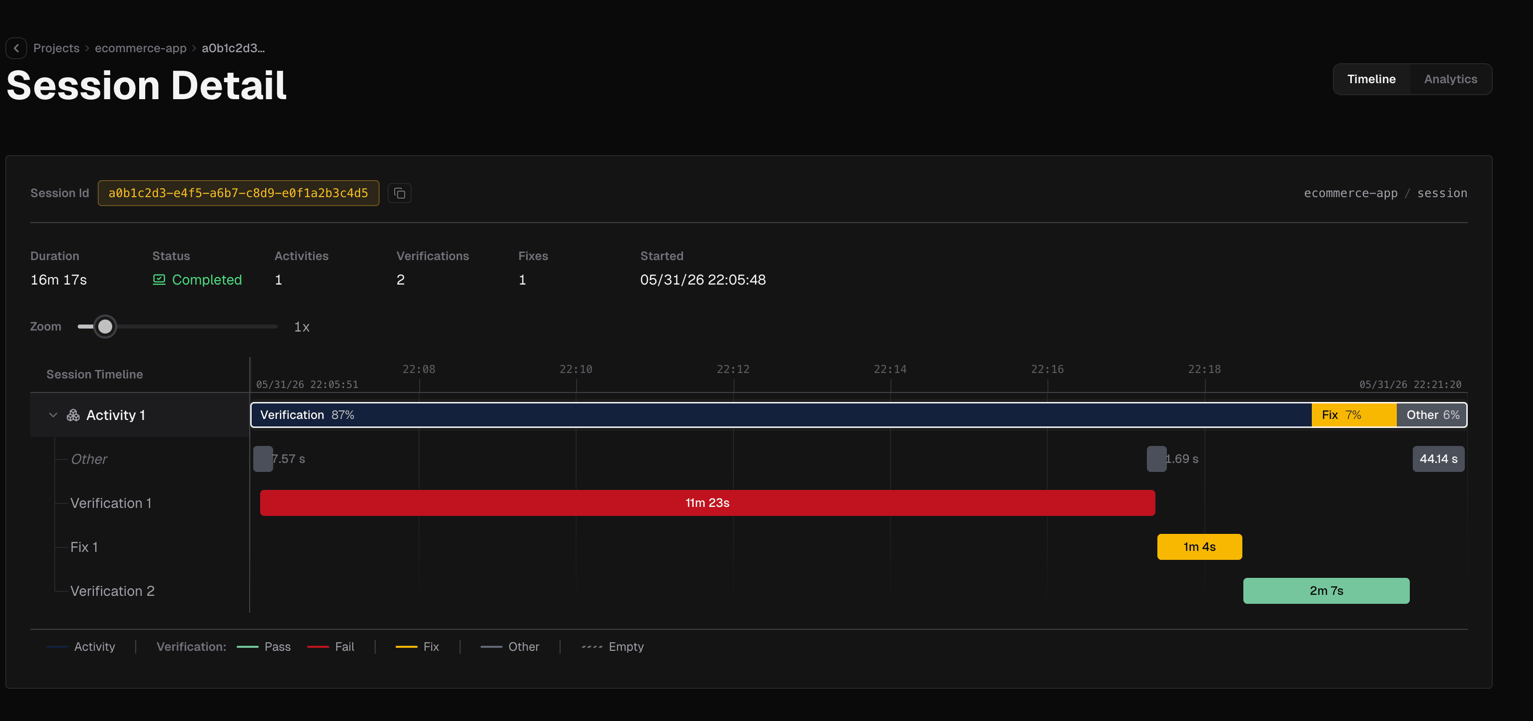
The Timeline tab renders the session as a horizontal time-series chart. Use the **Zoom slider** to control how much time each pixel represents, zoom in to inspect a short verification cycle, zoom out to see the full session arc.
 ## Chart layout
The chart is split into two synchronized columns:
**Left Labels column**
Lists each activity as a row: Activity 1, Activity 2, and so on. Click a row to expand it and reveal its nested child rows: verifications, fixes, and other intervals that belong to that activity. The expanded state is indicated by a chevron icon.
**Right Chart area**
Scrollable horizontally. Each row in the labels column has a corresponding colored interval bar in the chart area. Nested child bars appear below their parent when the activity is expanded. Tick marks and an axis row at the top show the time scale.
## Interactions
* **Click an interval bar** selects it and opens a detail panel on the right side
* **Drag horizontally** pans the chart
* **Zoom slider** adjusts the time scale
## Detail panels
Clicking an interval opens one of four panels depending on what was clicked:
### Verification panel
## Chart layout
The chart is split into two synchronized columns:
**Left Labels column**
Lists each activity as a row: Activity 1, Activity 2, and so on. Click a row to expand it and reveal its nested child rows: verifications, fixes, and other intervals that belong to that activity. The expanded state is indicated by a chevron icon.
**Right Chart area**
Scrollable horizontally. Each row in the labels column has a corresponding colored interval bar in the chart area. Nested child bars appear below their parent when the activity is expanded. Tick marks and an axis row at the top show the time scale.
## Interactions
* **Click an interval bar** selects it and opens a detail panel on the right side
* **Drag horizontally** pans the chart
* **Zoom slider** adjusts the time scale
## Detail panels
Clicking an interval opens one of four panels depending on what was clicked:
### Verification panel
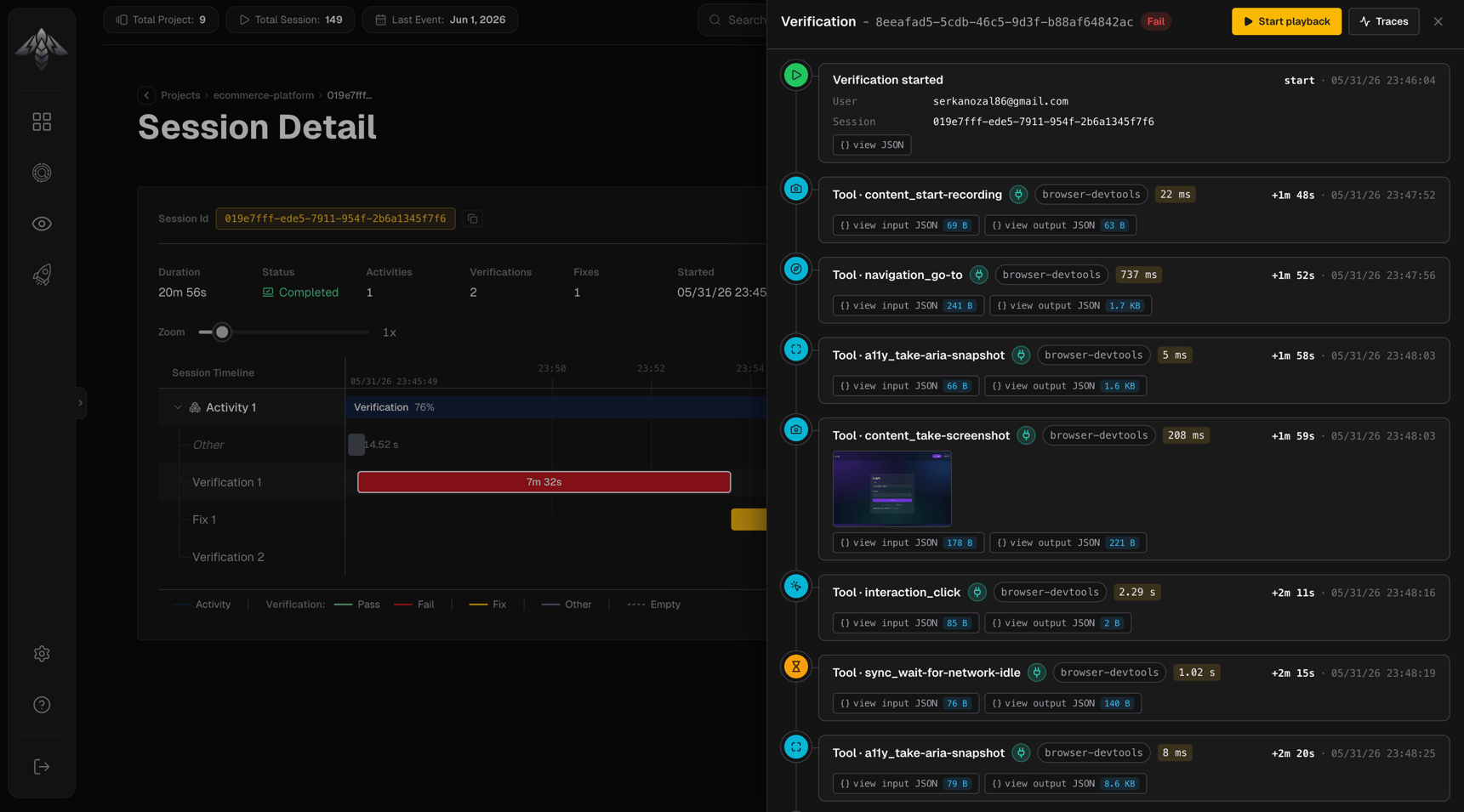 Opens when a verification interval is clicked. Shows:
* Verdict (pass or fail)
* Checks the agent confirmed
* Issues reported (on fail)
* Fixes applied (on a passing retry)
* Trace data for the cycle
### Fix panel
Opens when a verification interval is clicked. Shows:
* Verdict (pass or fail)
* Checks the agent confirmed
* Issues reported (on fail)
* Fixes applied (on a passing retry)
* Trace data for the cycle
### Fix panel
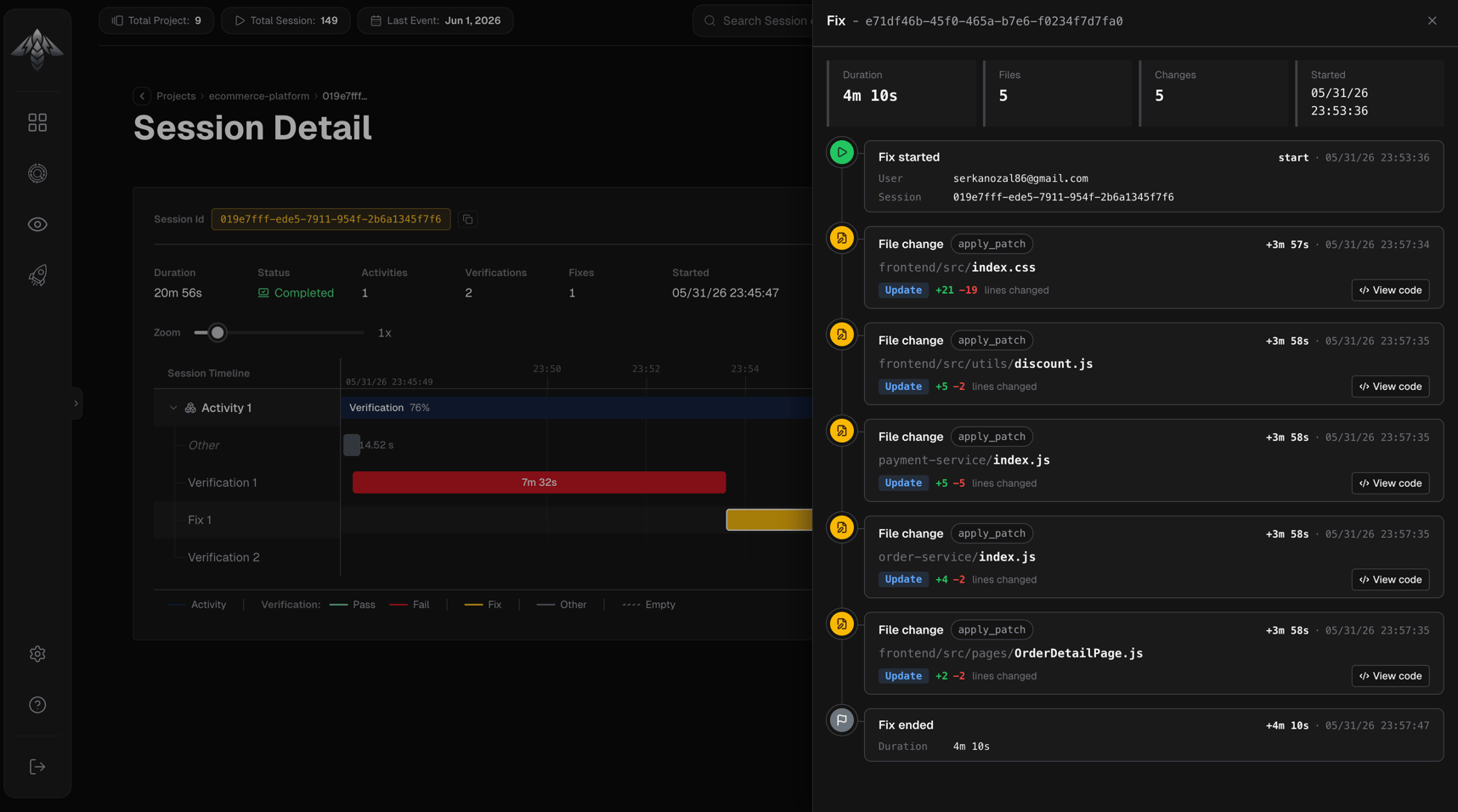 Opens when a fix interval is clicked. Shows the fix details and the code diff.
### Activity panel
Opens when a fix interval is clicked. Shows the fix details and the code diff.
### Activity panel
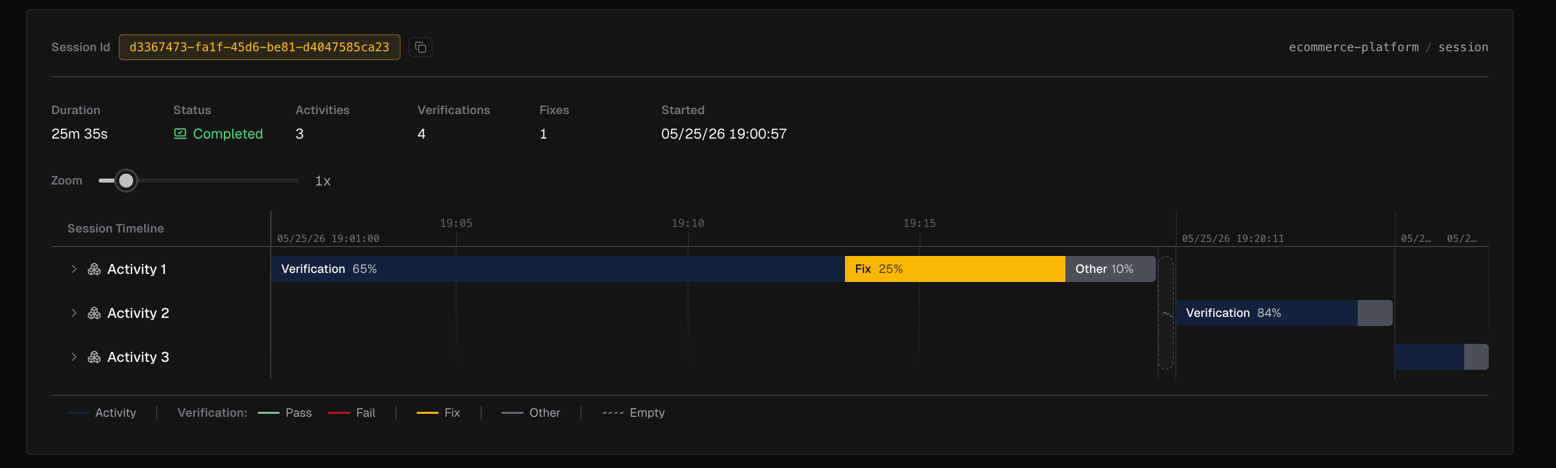 Opens when an activity interval bar is clicked directly (without selecting a child). Shows metadata for that activity.
### Other panel
Opens when an activity interval bar is clicked directly (without selecting a child). Shows metadata for that activity.
### Other panel
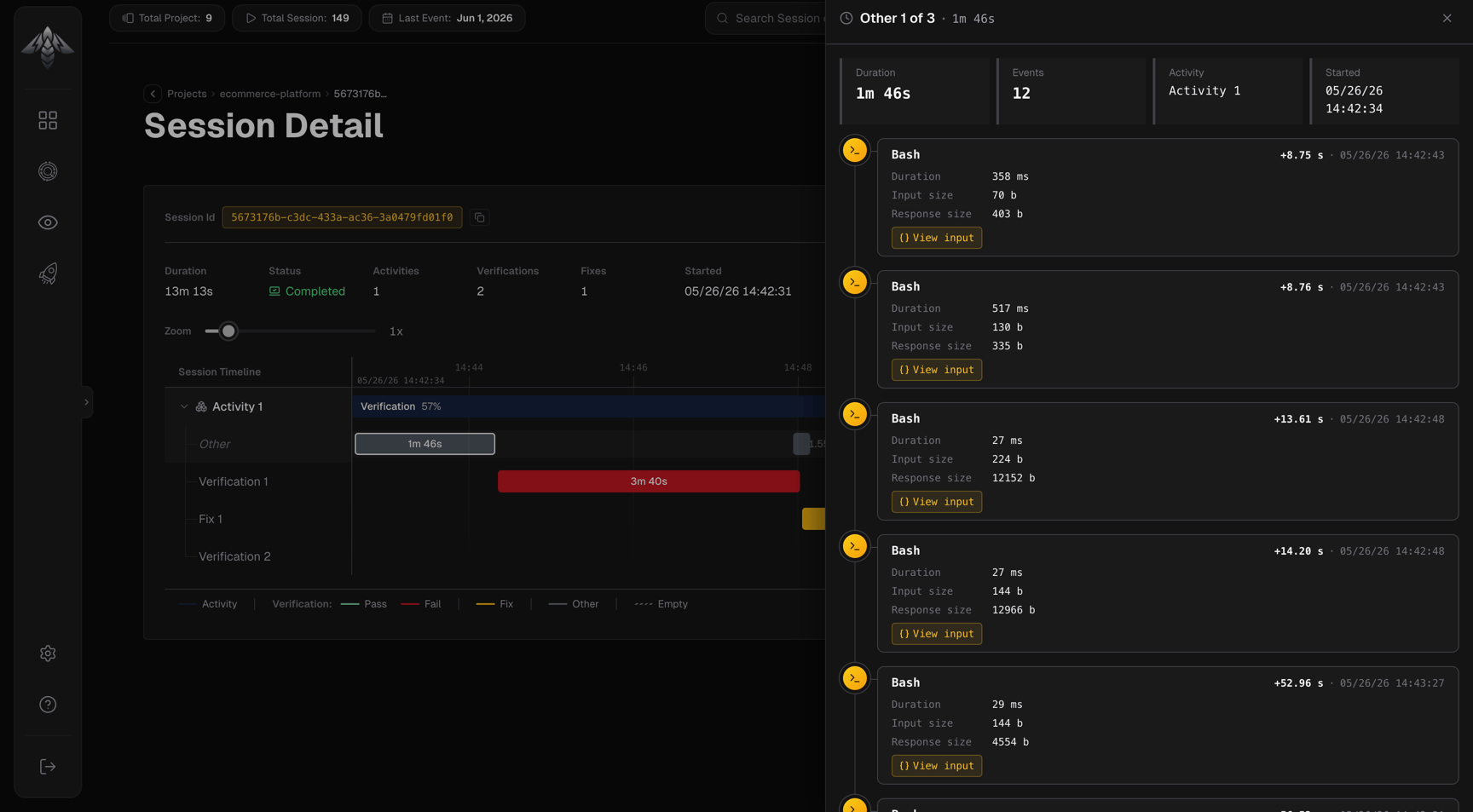 Opens when an unaccounted interval is clicked. Shows context about time within an activity that was neither a verification nor a fix which is idle time, thinking, or tool calls not captured in a named cycle.
Click anywhere outside a panel to close it.
## Related pages
Verification cycles with evidence and verdicts.
Code changes the agent made to resolve failures.
Opens when an unaccounted interval is clicked. Shows context about time within an activity that was neither a verification nor a fix which is idle time, thinking, or tool calls not captured in a named cycle.
Click anywhere outside a panel to close it.
## Related pages
Verification cycles with evidence and verdicts.
Code changes the agent made to resolve failures.