> ## Documentation Index
> Fetch the complete documentation index at: https://docs.ironbee.ai/llms.txt
> Use this file to discover all available pages before exploring further.
# Interactive Mode (TUI)
> Manage IronBee from a full-screen terminal UI instead of individual commands.
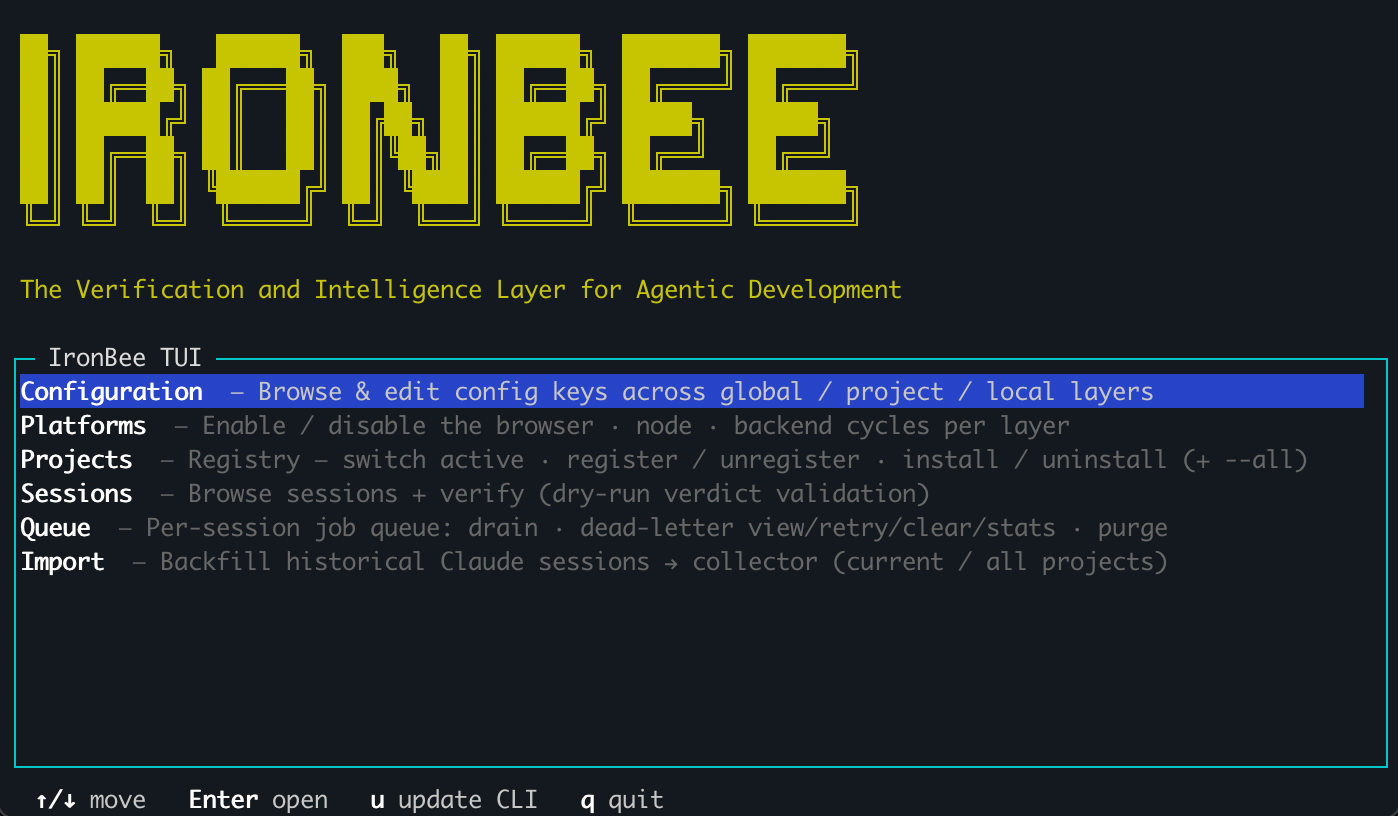
`ironbee tui` opens a full-screen interactive terminal UI, a single place to browse your projects, toggle platforms, edit config, and inspect sessions without remembering individual commands.
It mirrors the CLI: anything you do in the TUI runs the same underlying logic as the matching command.
 ***
## Launch
```bash theme={null}
ironbee tui
```
This opens the home menu. You can also jump straight into a specific area:
```bash theme={null}
ironbee tui platforms
ironbee tui projects -p /path/to/project
```
| Argument / flag | Description |
| --------------- | ----------------------------------------------------------------------------------------------- |
| `[area]` | Open directly into an area: `config`, `platforms`, `projects`, `sessions`, `queue`, or `import` |
| `-p ` | Start with a specific project as the active one (default: current directory) |
The TUI needs an interactive terminal. In a non-interactive context (CI, piped output) it exits with a hint to use the equivalent `ironbee config` commands instead.
***
## Areas
| Area | What you can do |
| ----------------- | ------------------------------------------------------------------------------------------------------------------------------------------------------------------------------------------- |
| **Configuration** | Browse and edit config keys across the global, project, and local layers; see the effective merged value and where it comes from |
| **Platforms** | Toggle the browser, Node, Python, backend, Android, and terminal cycles per layer — or press **`s`** to have a detected client suggest the set and apply it |
| **Projects** | Install, uninstall, register, or unregister for the current directory or any project in your inventory; switch which project is active |
| **Sessions** | Browse sessions with their phase, verdict, and retry counts; run a read-only verdict check |
| **Scenarios** | Browse [saved verification scenarios](/cli/guides/scenarios) with their freshness (fresh / stale / unknown vs the current code). Read-only — repair is the agent's `/ironbee-sync-scenario` |
| **Queue** | Inspect and drain the background job queue; manage dead-letter entries |
| **Import** | Backfill historical sessions with a live dry-run estimate before you commit |
Installing from the **Projects** area runs the same flow as the CLI: a client picker when more than one is detected, then a **mode single-select** (`enforce` / `assist` / `monitor` — the equivalent of `ironbee install --mode`) and, unless you pick `monitor`, a **platform multi-select** (pre-checked from the project's current config — the equivalent of `ironbee install --platforms`) to choose which cycles to enable, including the same **`s` suggest** key.
***
## Navigating
| Key | Action |
| ------------------------ | --------------------- |
| `↑` / `↓` (or `j` / `k`) | Move within a list |
| `Enter` | Select / open |
| `Esc` | Back to the home menu |
| `q` / `Ctrl-C` | Quit |
The breadcrumb at the top always shows the **active project**. In the Projects area you can switch which project is active, and every project-scoped area (Configuration, Platforms, Sessions, Queue) retargets to it, so you can launch in one repo and inspect or edit another without changing directories.
***
## What's next?
The keys behind the Config area, in full.
The commands behind the Sessions area.
***
## Launch
```bash theme={null}
ironbee tui
```
This opens the home menu. You can also jump straight into a specific area:
```bash theme={null}
ironbee tui platforms
ironbee tui projects -p /path/to/project
```
| Argument / flag | Description |
| --------------- | ----------------------------------------------------------------------------------------------- |
| `[area]` | Open directly into an area: `config`, `platforms`, `projects`, `sessions`, `queue`, or `import` |
| `-p ` | Start with a specific project as the active one (default: current directory) |
The TUI needs an interactive terminal. In a non-interactive context (CI, piped output) it exits with a hint to use the equivalent `ironbee config` commands instead.
***
## Areas
| Area | What you can do |
| ----------------- | ------------------------------------------------------------------------------------------------------------------------------------------------------------------------------------------- |
| **Configuration** | Browse and edit config keys across the global, project, and local layers; see the effective merged value and where it comes from |
| **Platforms** | Toggle the browser, Node, Python, backend, Android, and terminal cycles per layer — or press **`s`** to have a detected client suggest the set and apply it |
| **Projects** | Install, uninstall, register, or unregister for the current directory or any project in your inventory; switch which project is active |
| **Sessions** | Browse sessions with their phase, verdict, and retry counts; run a read-only verdict check |
| **Scenarios** | Browse [saved verification scenarios](/cli/guides/scenarios) with their freshness (fresh / stale / unknown vs the current code). Read-only — repair is the agent's `/ironbee-sync-scenario` |
| **Queue** | Inspect and drain the background job queue; manage dead-letter entries |
| **Import** | Backfill historical sessions with a live dry-run estimate before you commit |
Installing from the **Projects** area runs the same flow as the CLI: a client picker when more than one is detected, then a **mode single-select** (`enforce` / `assist` / `monitor` — the equivalent of `ironbee install --mode`) and, unless you pick `monitor`, a **platform multi-select** (pre-checked from the project's current config — the equivalent of `ironbee install --platforms`) to choose which cycles to enable, including the same **`s` suggest** key.
***
## Navigating
| Key | Action |
| ------------------------ | --------------------- |
| `↑` / `↓` (or `j` / `k`) | Move within a list |
| `Enter` | Select / open |
| `Esc` | Back to the home menu |
| `q` / `Ctrl-C` | Quit |
The breadcrumb at the top always shows the **active project**. In the Projects area you can switch which project is active, and every project-scoped area (Configuration, Platforms, Sessions, Queue) retargets to it, so you can launch in one repo and inspect or edit another without changing directories.
***
## What's next?
The keys behind the Config area, in full.
The commands behind the Sessions area.